
You paste a prompt into an AI chat window at 9:00 AM. It gives you a brilliant, sharp summary that saves you an hour of work.
You copy that exact same prompt into a new thread at 2:00 PM. The answer comes back completely different—vague, rambling, and missing key details.
I used to think I was doing something wrong, or that the AI platform was constantly changing its rules behind my back.
It turns out, there is a fascinating technical reason why Large Language Models behave like a roll of the dice. Even when you set randomness settings down to zero, getting identical outputs is remarkably difficult.
This is why your team gets two completely different project outlines despite using the exact same prompt template in back-to-back meetings.
How AI Decisions Are Made Step-by-Step
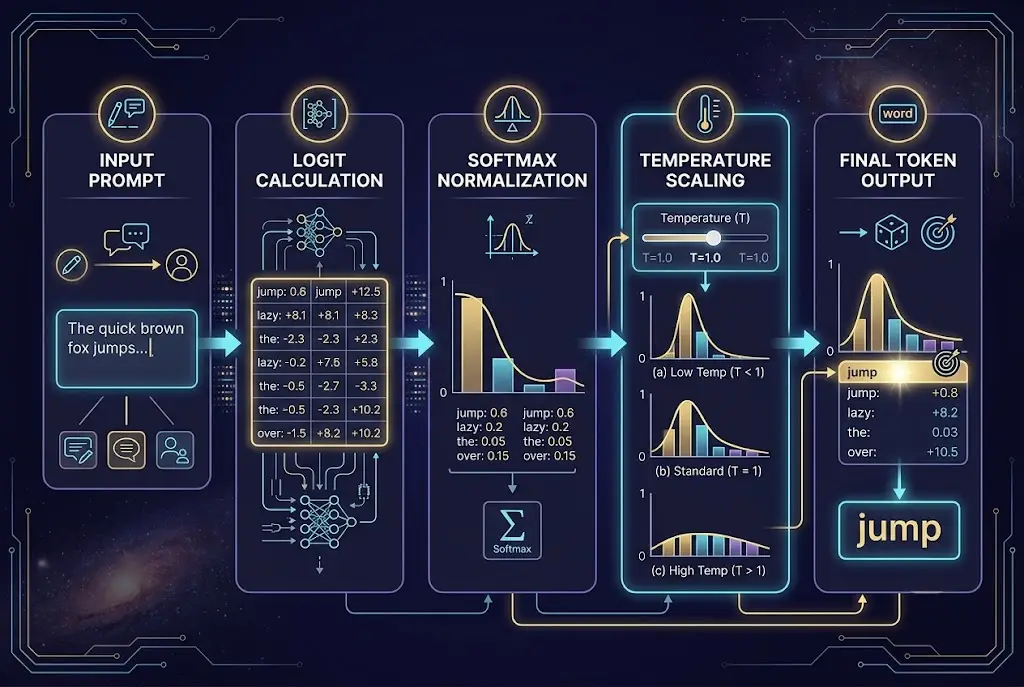
To understand why outputs drift, you have to look at how language models actually choose their words. AI doesn't write in full sentences or ideas. It operates as a high-speed token prediction engine.
When you send a prompt, the model processes your text into tiny chunks called tokens. It calculates a probability score—known as a logit—for every possible next token in its entire vocabulary.
{
  "prompt": "The sky today is unusually",
  "candidate_tokens": {
    "clear": 0.45,
    "blue": 0.35,
    "cloudy": 0.12,
    "bright": 0.05,
    "purple": 0.001
  }
}
Instead of always picking the token with the single highest probability, the model uses a process called token sampling. It converts those raw scores into a probability distribution and rolls a mathematical die to select the next word.
As explained in Cognativ's technical analysis on LLM sampling, this sampling mechanism is precisely what gives language models their fluid, human-like creativity. Without it, AI writing would sound rigid, robotic, and repetitive.
"Language models do not recall facts like a database; they navigate a vast probabilistic landscape where every word slightly shifts the path ahead."
If you ever feel like your prompts yield unpredictable results, you might assume you've been prompting AI wrong this whole time. But often, the underlying probability engine is simply taking a slightly different branch down the path.
 Why the Same Prompt Gives Different Results Every Time
The Controls That Shift Your Results
Most modern AI tools expose parameters that dictate how bold or cautious the model should be when rolling its mathematical dice. The two most influential controls are Temperature and Top-P.
Temperature adjusts the shape of the probability distribution. A high temperature flattens the curve, giving long-shot words a higher chance of selection. A low temperature sharpens the curve, heavily favoring top predictions.
Top-P (Nucleus Sampling) cuts off the tail end of unlikely tokens altogether. If you set Top-P to 0.9, the model only considers the pool of top tokens that make up the top 90% of total probability mass.
| Parameter Setting | Mathematical Effect | Resulting Tone & Behavior | Best Workflows |
|---|---|---|---|
| Temperature 0.0 | Extreme sharpening | Highly focused, near-greedy selection | Code generation, data extraction |
| Temperature 0.2 | Moderate sharpening | Consistent, conservative, structured | Business reports, formal emails |
| Temperature 0.7 | Balanced curve | Standard conversational balance | General writing, summarization |
| Temperature 1.0+ | Flattened distribution | Highly creative, unpredictable, risky | Brainstorming, poetry, fiction |
This is why your creative brainstorming sessions yield wild variations while your technical code summaries stay relatively consistent.
Why Setting Temperature to Zero Still Fail to Guarantee Match
There is a widespread myth in prompt engineering that setting temperature = 0 guarantees bitwise identical outputs every single time.
In theory, zero temperature forces greedy decoding, where the model unconditionally picks the token with the highest probability. But in production cloud environments, that theory falls apart.
A comprehensive benchmark published on arXiv on LLM non-determinism demonstrated that hosted LLM APIs configured with zero temperature still produce output variations up to 15% across identical runs.
Why does this happen? The answer lies in floating-point arithmetic inside physical graphics processors (GPUs).
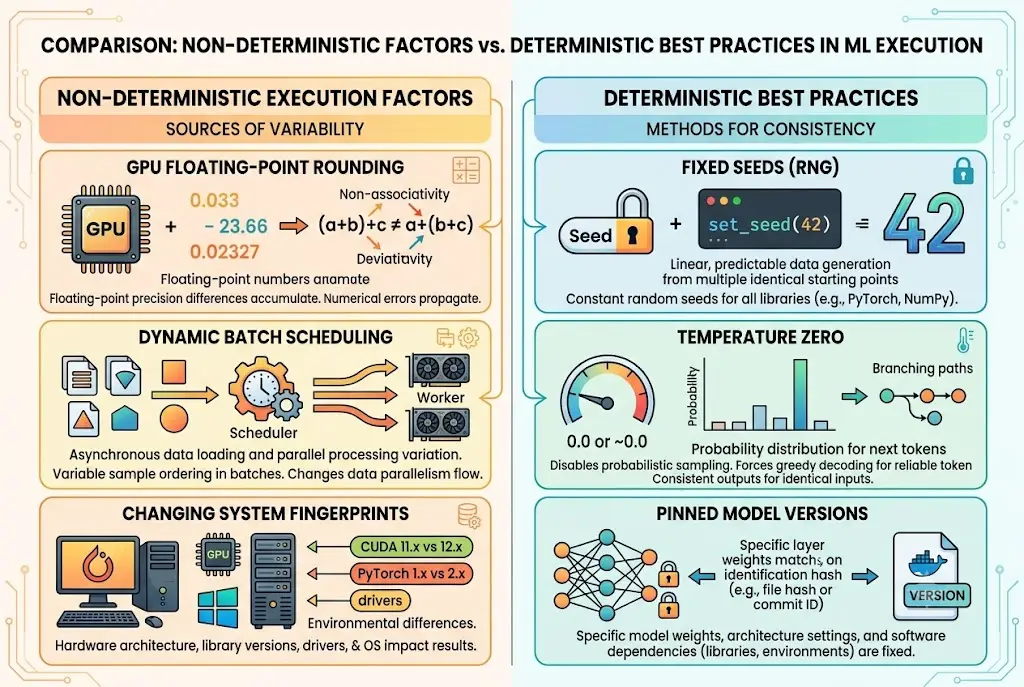
When millions of mathematical operations happen simultaneously across matrix computations, tiny rounding variations occur at the 16th decimal place. If two candidate tokens have virtually identical scores, a microscopic floating-point rounding difference changes which word wins the tie-breaker.
Once a single different token is picked at word position four, every subsequent probability calculation branches into a new direction.
This is why switching models mid-project or running the same prompt hours apart leads to noticeably different paragraph structures.
What Happens Inside Cloud GPU Clusters
When you hit send on an AI platform, your request travels to a massive cloud data center running thousands of GPUs in parallel.
To handle millions of active users efficiently, cloud providers use dynamic batching. Your prompt is grouped together with prompts from dozens of other users and executed on whatever GPU node becomes free first.
As detailed by technical benchmarks from Towards Data Science, different GPU architectures (such as NVIDIA A100 vs H100) execute matrix multiplication kernels with subtle hardware optimizations.
Furthermore, cloud systems frequently update backend infrastructure. As noted in OpenAI's developer documentation, server-side configurations periodically trigger changes in the model's system_fingerprint.
Research published by Future AGI on non-deterministic prompts highlights that concurrent execution schedules create non-deterministic race conditions during GPU memory reads, ensuring that exact output reproduction remains elusive.
This is why a prompt tested on your individual developer account produces a different output when executed across your company's shared workspace.
 Why the Same Prompt Gives Different Results Every Time
Practical Ways to Lock Down Your AI Workflow
While total bitwise reproducibility is nearly impossible in cloud environments, you can drastically reduce variation when consistency is essential for your work.
1. Fix the Random Seed
Many modern API integrations and multi-model workspaces allow you to specify a fixed seed integer. Passing the same seed across requests helps lock down the pseudorandom number generator during sampling.
2. Pin Specific Model Snapshots
Avoid using moving targets like "latest-model". Instead, lock your system to dated snapshots (e.g., gpt-4o-2024-08-06). Snapshot updates quietly change model weights, altering output behavior.
3. Use Context Anchoring
When you need consistent output formatting, supply 2–3 concrete examples inside your prompt. Giving the model explicit structural examples anchors its probability distribution, reducing drift regardless of sampling variance.
Understanding how different architectures process context also helps explain why your AI answers differ across models even when prompt settings match.
When your projects require strict reliability, knowing when to switch AI models gives you far more control over output quality than forcing a single model to do everything.
Finding Order in the Noise
Variability in AI isn't inherently a bug—it is the foundational feature that makes language models feel intuitive and creative rather than like rigid spreadsheets.
By understanding token sampling, GPU floating-point math, and temperature controls, you can stop fighting randomness and start directing it.
If you rely on AI daily, tweaking your temperature settings or pinning your prompt seeds on your next big project could save you hours of rewriting.
Frequently asked questions
Does setting temperature to 0 make AI output completely deterministic?
What is the difference between Temperature and Top-P?
Why does my prompt give different results in the morning vs at night?
How can I make my AI outputs as consistent as possible?
We build VirtuaChat and write about getting real work done with AI — prompting, models, images and audio.