
You type out your request, hit send, and wait. The AI spits out an answer. Sometimes it’s brilliant, exactly what you needed. Other times? It’s generic, off-topic, or just plain weird. If you’ve experienced this inconsistency, you’re not alone. I’ve seen countless people, even daily AI users, struggle to get truly consistent, high-quality results.
The truth is, most of us learn to prompt AI on the fly, experimenting with what works. But there's a fundamental misunderstanding about how AI processes information, and this misunderstanding is costing you time, effort, and potentially much better outputs. You've been prompting AI, but maybe not effectively prompting it.
The "Google Search" Trap: Why Simple Queries Fail
Many people approach AI chat like a souped-up search engine. You type a keyword or a short question, expecting a perfect answer. And while large language models (LLMs) are incredibly powerful, they aren’t mind-readers. They don't inherently understand your underlying intent, context, or what "good" looks like to you.
This is why your AI content sometimes sounds robotic, or your generated images look generic. You’re asking for a general outcome without providing the specific ingredients. Think of it this way: if you ask a world-class chef for "food," you might get anything. If you ask for "a savory, plant-based Italian dish, featuring basil and sun-dried tomatoes, suitable for a casual dinner party," you're far more likely to get something incredible.
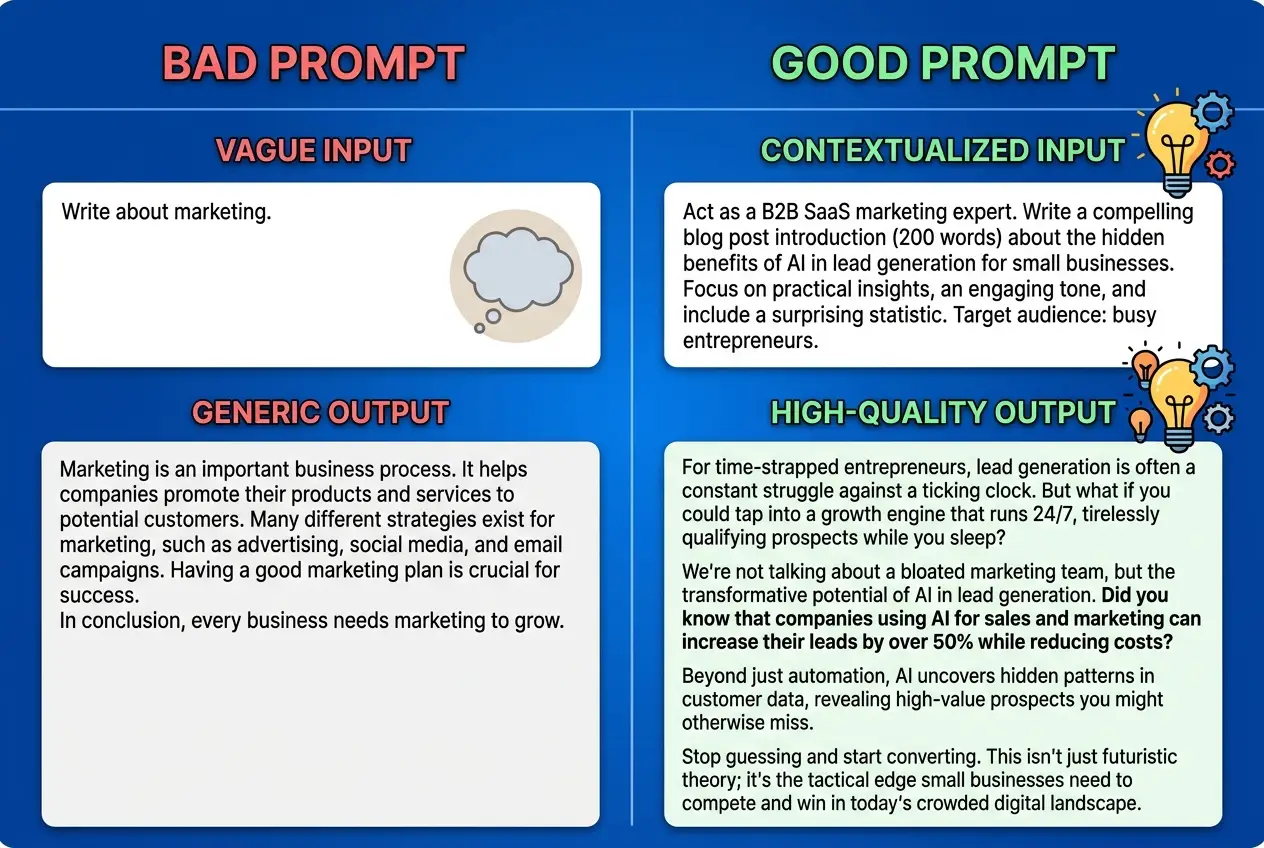 You've Been Prompting AI Wrong This Whole Time
It's All About Context: The AI's Operating Manual
The biggest shift you can make in your prompting approach is to treat the AI not as a search bar, but as a highly intelligent, albeit blank, slate that needs an operating manual for each specific task.
Every successful prompt I write includes these elements:
- Role: Tell the AI who it is. "You are a senior marketing manager," "Act as an expert Python developer," "Imagine you're a compassionate career coach." This instantly frames its perspective and tone.
- Goal: What do you want to achieve? "Generate three unique ideas," "Summarize this article for a 5th grader," "Draft an email to a difficult client."
- Audience: Who is receiving this output? "For non-technical stakeholders," "My engineering team," "Potential customers who are new to AI."
- Format/Constraints: How should the output look? "A bulleted list," "A 500-word blog post," "Code in Python 3.9, with docstrings," "An image in a retro-futuristic style."
- Specific Details/Keywords: What must be included or excluded? This is where your unique information comes in.
This is why your teammate's AI output often looks better than yours — they're probably giving the AI a much clearer set of instructions upfront. They're not just asking; they're directing.
## Example of a "Bad" Prompt:
Write a blog post about AI.

## Example of a "Good" Prompt:
Act as a seasoned tech journalist specializing in AI ethics. Your task is to write a 750-word blog post for a general audience, exploring the often-overlooked environmental impact of large AI models. Focus on energy consumption and data center footprints, providing tangible examples. Maintain an informative yet approachable tone, and ensure the conclusion offers actionable steps for more sustainable AI development.
The difference is stark. The second prompt gives the AI everything it needs to tailor its knowledge base to your specific request, rather than guessing. This concept is central to effective prompt engineering.
Iteration, Not Just Generation: The Conversation is Key
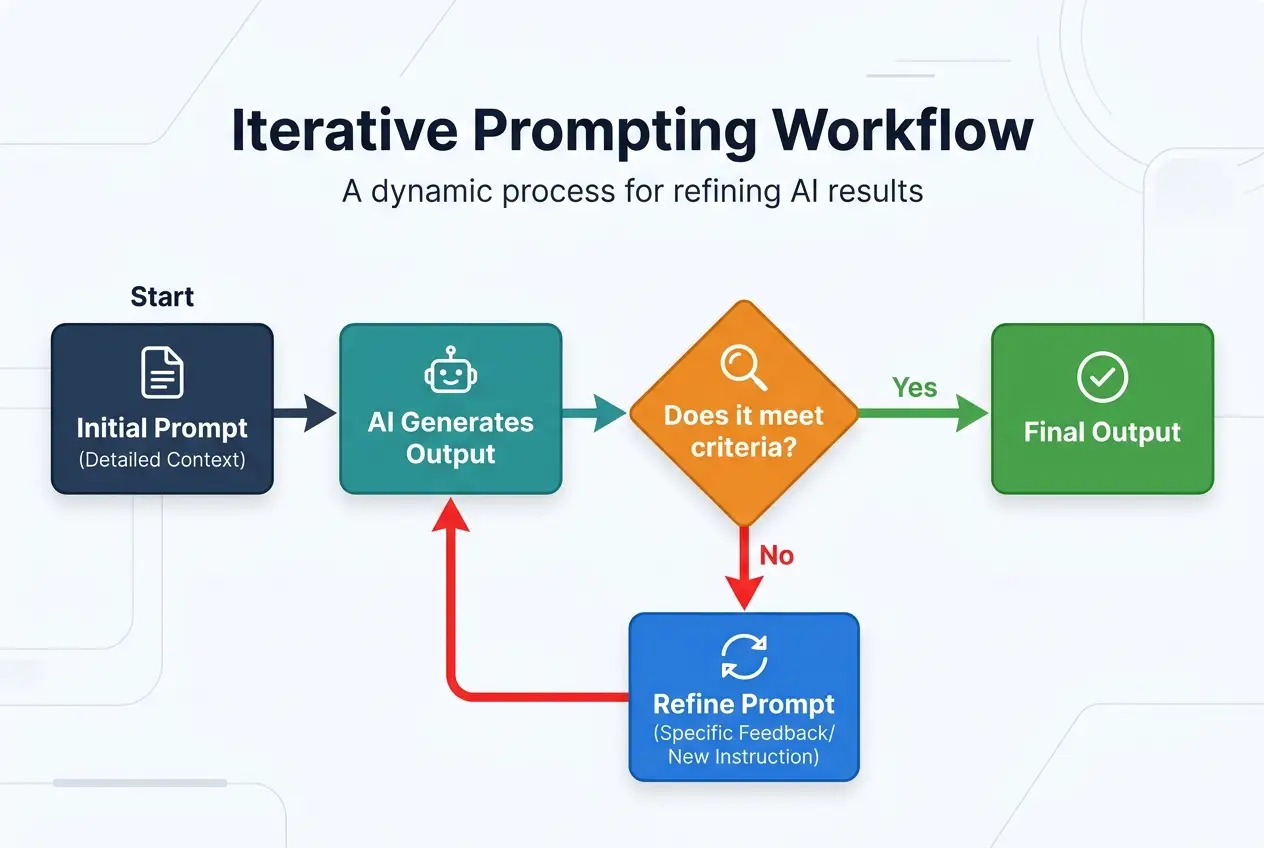
Once you’ve provided a strong initial prompt, don't just accept the first output. Effective AI use is a dialogue, not a monologue. I've found that the best results come from an iterative process of refining the AI's output.
- Review Critically: Does it meet all your criteria? Is anything missing?
- Provide Feedback: "Make it sound more urgent," "Can you add a section on X?", "This paragraph is too long, shorten it," "Remove any jargon."
- Ask Follow-up Questions: "What are three alternative headlines?", "Expand on point number two."
This is why switching models mid-conversation kills your results. The AI builds context with each turn. When you restart with a new model or a new chat, you lose all that valuable accumulated information, forcing the AI to start from scratch. Maintaining the conversational thread allows the AI to learn and adapt to your preferences over time. This technique is often referred to as "chain-of-thought prompting" or "multi-turn prompting" in the field of natural language processing.
If you're interested in keeping your AI projects on track, understanding how to maintain context across longer interactions is crucial. You might find some insights in mastering multi-step AI projects here.
Beyond Text: Prompting for Visuals and Code
The principles of context and iteration apply across all AI modalities offered by powerful multi-model platforms.
Image Generation
When I generate images, I often see people use prompts like "cute dog." The result is predictably generic. Instead, be a visual director:
- "A whimsical golden retriever puppy, sitting in a field of glowing lavender, with soft dappled sunlight and bokeh background. Digital art, volumetric lighting, hyper-detailed, fantasy illustration style."
Specify the subject, setting, style, lighting, and mood. The more specific you are, the less the AI has to guess, and the closer your image will be to your vision. This is why your AI image might look like a stock photo from 2009 — you’re giving it generic instructions.
Code Assistance
For developers, AI is a game-changer, but only if you prompt it correctly. Instead of "write some Python code," try:
- "Act as a senior Python developer. I need a Flask API endpoint that accepts a JSON payload with 'name' and 'email' fields, validates them, and stores them in a SQLite database. Include error handling for invalid input and a
GETendpoint to retrieve all entries. Provide the full code with necessary imports and comments."
The more context you give — the language, framework, specific functionality, validation rules, and even desired comments — the higher the quality of the generated code. This mirrors best practices in software development, where clear requirements lead to better outcomes. Understanding how machine learning models process these detailed instructions can dramatically improve your coding workflow.
 You've Been Prompting AI Wrong This Whole Time
The Prompt Engineering Mindset: Thinking Like the AI
Ultimately, mastering AI prompting isn't about memorizing complex commands. It's about developing a new way of thinking. You need to anticipate what information the AI actually needs to perform optimally. It's like bridging the gap between human intent and computational logic, minimizing ambiguity. This requires a shift in perspective, moving from simply asking to actively guiding.
Think about potential cognitive biases the AI might have if not given clear instructions, or how it might interpret ambiguity. The goal is to provide such clear boundaries that the AI's "creative freedom" operates within your desired parameters.
I often tell people: "If you wouldn't give this vague instruction to a human intern and expect perfect results, don't give it to the AI." Empowering yourself with this mindset allows you to leverage AI’s full potential, transforming it from a mere tool into a true collaborator. For a deeper dive into optimizing your daily AI tasks, check out our guide on AI workflows.
If you're already using AI daily, one workflow change this week could save you hours. Start with the smallest one.
Frequently asked questions
How can I ensure the AI maintains context over very long conversations?
Is there a universal 'best' way to start a prompt?
What if I don't know all the details to provide in a prompt?
Can I use different AI models for different parts of a project?
How do I know if my prompt is 'good enough'?
We build VirtuaChat and write about getting real work done with AI — prompting, models, images and audio.