You’ve been there. You paste the same prompt you used last week, expecting similar magic, but the AI gives you something completely different, or worse, completely bland. Or maybe you're stuck iterating endlessly on a piece of code or a marketing blurb, feeling like your AI tool has hit its limit. What gives?
Most people approach AI with a "one size fits all" mentality. They find an AI tool they like and stick with it for every single task. This is why your AI output often feels inconsistent, or you hit a creative wall. I've found that the biggest leap in AI productivity doesn't come from a secret prompt formula, but from understanding when to switch models.
Think of AI models not as a single super-brain, but as a team of specialists. Just as you wouldn’t ask a chef to build a house, you shouldn't ask a creativity-focused AI to debug complex code. Each model, from large language models (LLMs) like GPT-4, Claude, and Gemini to specialized image generators like DALL-E, has its unique strengths, biases, and limitations. Ignoring this means you’re leaving most of AI’s potential on the table.
Why One AI Isn't Enough for Every Task
The landscape of artificial intelligence is vast and rapidly evolving. Different AI models are trained on different datasets, with varying architectures and optimization goals. This specialization is their superpower, but it also means no single model is perfect for everything.
I remember when I first started exploring AI beyond basic chat. I’d try to get GPT-3.5 to write a compelling marketing email, then immediately use it to debug a Python script. The results were… passable, at best. The emails lacked punch, and the code often had subtle, hard-to-find errors. It wasn't until I started experimenting with different models for different tasks that my productivity truly skyrocketed.
This is why understanding the nuanced strengths of various models is crucial. For instance, some models excel at creative writing and brainstorming due to their vast and diverse training data, while others are fine-tuned for logical reasoning, coding, or summarizing extensive documents. As Google's Demis Hassabis once stated, "The ultimate goal is to build general AI systems, but even then, specialized modules will likely play a crucial role."
 When to Switch AI Models: The Multi-Model Secret
Knowing When to Make the Jump: Practical Scenarios
The real trick is identifying the right moment to pivot. It’s not about using every AI for every prompt; it’s about strategic application.
Creative Brainstorming & Ideation
When you're staring at a blank page, needing fresh ideas for a blog post, marketing campaign, or a new product feature, a model known for its creativity and conversational fluency will be your best friend.
This is why your AI image prompt works better after a Claude brainstorm. Models like Claude 3 or even specific Gemini iterations are often praised for their imaginative capabilities, ability to generate diverse perspectives, and less "formulaic" outputs. They can help you break through creative blocks with unexpected angles.
&code_block; Prompt for Creative Brainstorming (using a creative-focused model): "I'm developing a new eco-friendly kitchen gadget. Brainstorm 10 unique, catchy names and slogans. Also, suggest 3 unconventional marketing angles that highlight its sustainability without sounding preachy." &code_block;
Once you have a solid conceptual foundation, you might switch to a more precise model for drafting, or an image generation AI to visualize your ideas.
Technical & Code Assistance
For developers, coders, or anyone needing precise, functional outputs, logical reasoning and accuracy are paramount. While many LLMs can generate code, their quality varies significantly.
This is why your AI-generated code keeps throwing syntax errors in one model but works flawlessly in another. Models like GPT-4 or specialized coding AIs often have a deeper understanding of programming logic, syntax, and best practices because they've been trained on vast repositories of code and technical documentation. They can not only write code but also debug, refactor, and explain complex concepts.
&code_block; Prompt for Code Assistance (using a code-focused model): "Write a Python function that takes a list of dictionaries (each representing a user with keys 'name', 'email', 'status') and returns a new list containing only users whose 'status' is 'active' and whose 'email' ends with '@example.com'. Include type hints and a docstring." &code_block;
After getting the initial code, you might use a more conversational AI to help you write user-friendly documentation or explain the function to a non-technical team member. You can learn more about managing multi-step AI projects and retaining context effectively by exploring strategies to stop AI forgetting and master multi-step AI projects.
Data Analysis & Summarization
Dealing with large volumes of text – reports, research papers, meeting transcripts – requires an AI with excellent long-context understanding and summarization capabilities.
This is why summarizing that 50-page report is a nightmare with one AI and a breeze with another. Some models are designed to handle longer input contexts, allowing them to grasp the full scope of a document before distilling its essence. Claude 3, for instance, has gained a reputation for its extensive context window, making it ideal for digesting lengthy texts and identifying key themes.
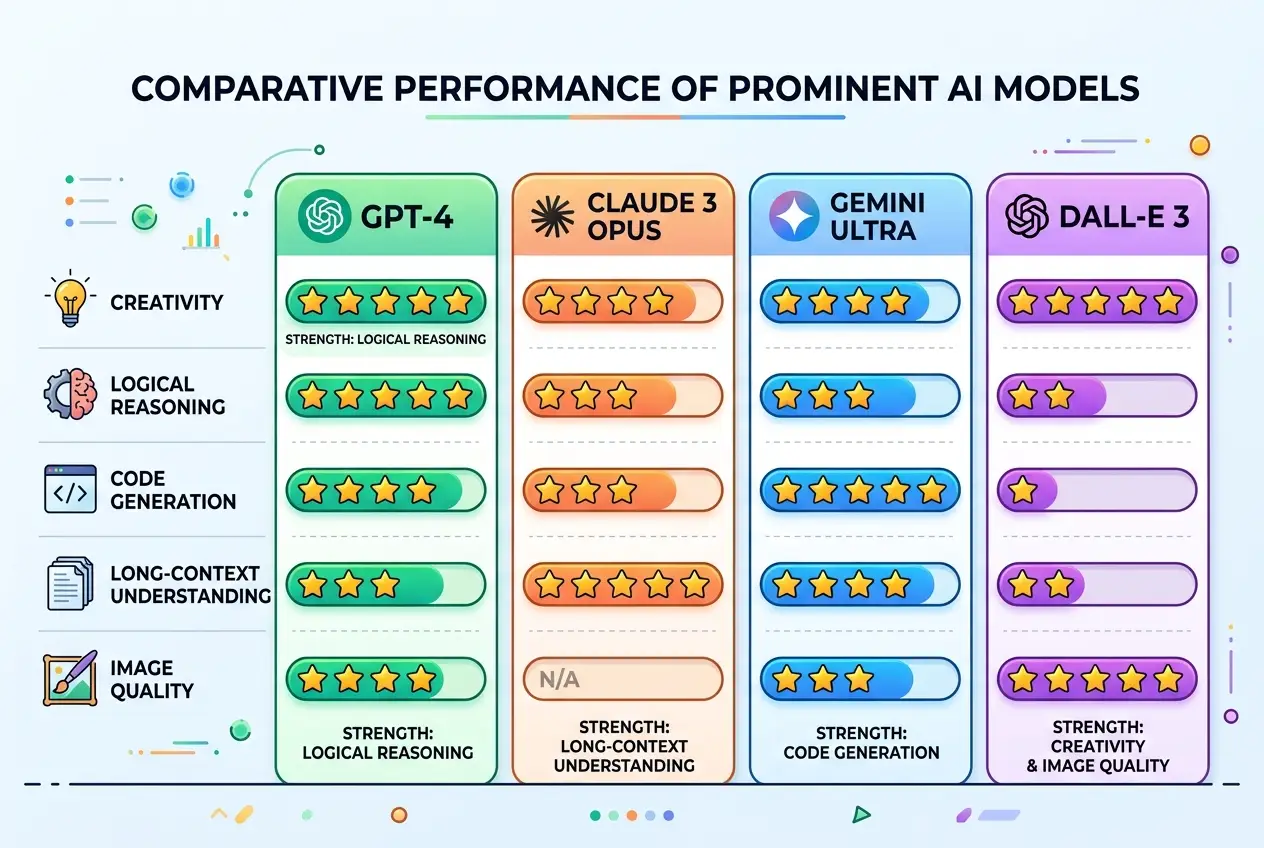
Here's a quick comparison of general strengths for common tasks:
| Task Category | Best AI Model Type (General) | Key Strength |
|---|---|---|
| Creative Writing | Claude 3, Gemini Pro | Imagination, tone, diverse ideas |
| Technical Writing/Code | GPT-4, specialized dev AIs | Logic, accuracy, syntax, best practices |
| Long Document Analysis | Claude 3, GPT-4 (large context) | Context understanding, summarization, extraction |
| Image Generation (Text-to-Image) | DALL-E 3, Midjourney | Visual quality, specific styles, composition |
| Quick Q&A / Information Retrieval | GPT-3.5, Gemini | Speed, general knowledge, conciseness |
You can delve deeper into how to refine your prompts for better results across various models in our guide: You've Been Prompting AI Wrong This Whole Time.
Image Generation & Visual Concepts
When your task is to bring visual ideas to life, the choice of text-to-image model matters, but so does the text model you use to craft the prompt itself.
This is why your AI image looks like a stock photo from 2009 instead of a masterpiece. Often, the bottleneck isn't the image generator but the textual prompt's specificity and artistic direction. Using a highly creative LLM to expand a basic visual concept into a rich, detailed prompt before feeding it to DALL-E 3 or Midjourney can dramatically improve outcomes.
Strategies for Seamless Model Hopping
Successfully leveraging multiple AI models isn't about haphazard switching. It requires a strategic approach.
1. Define the Task First
Before you even open an AI tool, clearly articulate what you want to achieve. Is it a quick brainstorm? A precise code snippet? A comprehensive summary? Your goal dictates your model choice.
2. Understand Model Strengths
Keep a mental (or actual) cheat sheet of what each model excels at. As large language models (LLMs) continue to evolve, understanding their underlying training principles, often rooted in deep learning and natural language processing, becomes increasingly important. Wikipedia offers a comprehensive overview of Large Language Models and Generative AI.
3. Carry Context Intelligently
If you start a task in one model and switch to another, you can't just copy-paste the last interaction. Summarize the essential context or key decisions made in the previous model, then provide that concise summary to the new model as part of your initial prompt. This helps maintain continuity without overwhelming the new AI.
4. Iterate and Refine
Don’t expect perfection on the first try with any model. Use the AI's output as a starting point, then refine your prompt or even switch models if you feel stuck.
The Team Collaboration Angle
This multi-model approach isn't just for individuals. It’s a game-changer for teams. Imagine a scenario where a marketing team uses a creative AI for campaign ideas, while the development team relies on a code-focused AI for scripting, and the content team uses a summarization AI for market research.
This is where a unified platform that allows seamless access to multiple models becomes invaluable. Different team members can leverage their preferred AI for their specialized tasks, but all outputs can be centralized, shared, and iterated upon in one place. This democratizes AI usage, ensuring everyone on the team, from a Python developer to a copywriter, gets the best possible support for their specific needs, enhancing overall team productivity and collaboration. It also fosters a deeper understanding of software development and collaborative workflows.
Embrace the AI Ecosystem
Gone are the days of finding "the best" AI tool. We're in an era of AI ecosystems, where the true power lies in understanding the unique strengths of various models and dynamically switching between them to suit the task at hand. This isn't about finding a single AI that does everything; it's about orchestrating a symphony of specialized intelligences.
If you’re already using AI daily, one workflow change this week could save you hours and unlock unprecedented creativity. Start with identifying a task where your current AI tool feels limited, then research which model might excel there. Experiment, learn, and embrace the power of the multi-model secret.
Frequently asked questions
How do I discover which new AI models are worth trying for specific tasks?
Can I use multiple models on the same complex prompt chain without losing context?
Is there a performance or cost overhead to frequently switching between different AI models?
What if a specific 'best' model for a task isn't available to me?
How can I practically integrate multi-model workflows into my daily team tasks?
We build VirtuaChat and write about getting real work done with AI — prompting, models, images and audio.