
You ask an AI to refactor a 250-line file or process a 50-row CSV table. For the first thirty seconds, everything looks promising. The syntax is pristine, the logic flows naturally, and the model seems completely locked in.
Then, right around step four, it hits you with the ultimate cop-out:
// ... existing implementation remains unchanged ...
Or worse, it groups your carefully structured line items into a generic, lazy sentence: "And the remaining entries follow the same pattern above."
I run into this exact behavior almost daily when building software and analyzing datasets. It feels like watching a brilliant contractor show up on time, do impeccable work on the front porch, and then decide halfway through that painting the rest of the house is optional.
The instinct is to get angry at the model, hit regenerate, or add ALL CAPS shouting into your prompt: "DO NOT SKIP ANY CODE."
It rarely works. To actually fix this habit, you have to understand why it happens in the first place—and the answer has nothing to do with artificial intelligence suddenly getting "tired."
The Hidden Mechanics of AI Laziness
AI models do not possess stamina, boredom, or personal motivation. When an AI skips work, it is responding to mathematical and economic incentives embedded deep within its architecture.
At its core, every modern large language model calculates what word comes next based on patterns in training data. But generation costs compute, and more importantly, attention is a finite resource.
+-------------------------------------------------------------------+
|                        THE LAZINESS CYCLE                         |
|                                                                   |
|  Massive Input Context  -->  Attention Dilution  -->  RLHF Bias   |
|         (Bloat)              (Loss of Focus)         (Summarize)  |
|                                                          |        |
|  Incomplete Output      <--  Premature Stopping  <-------+        |
|  ("// rest of code")         ("Good Enough")                      |
+-------------------------------------------------------------------+
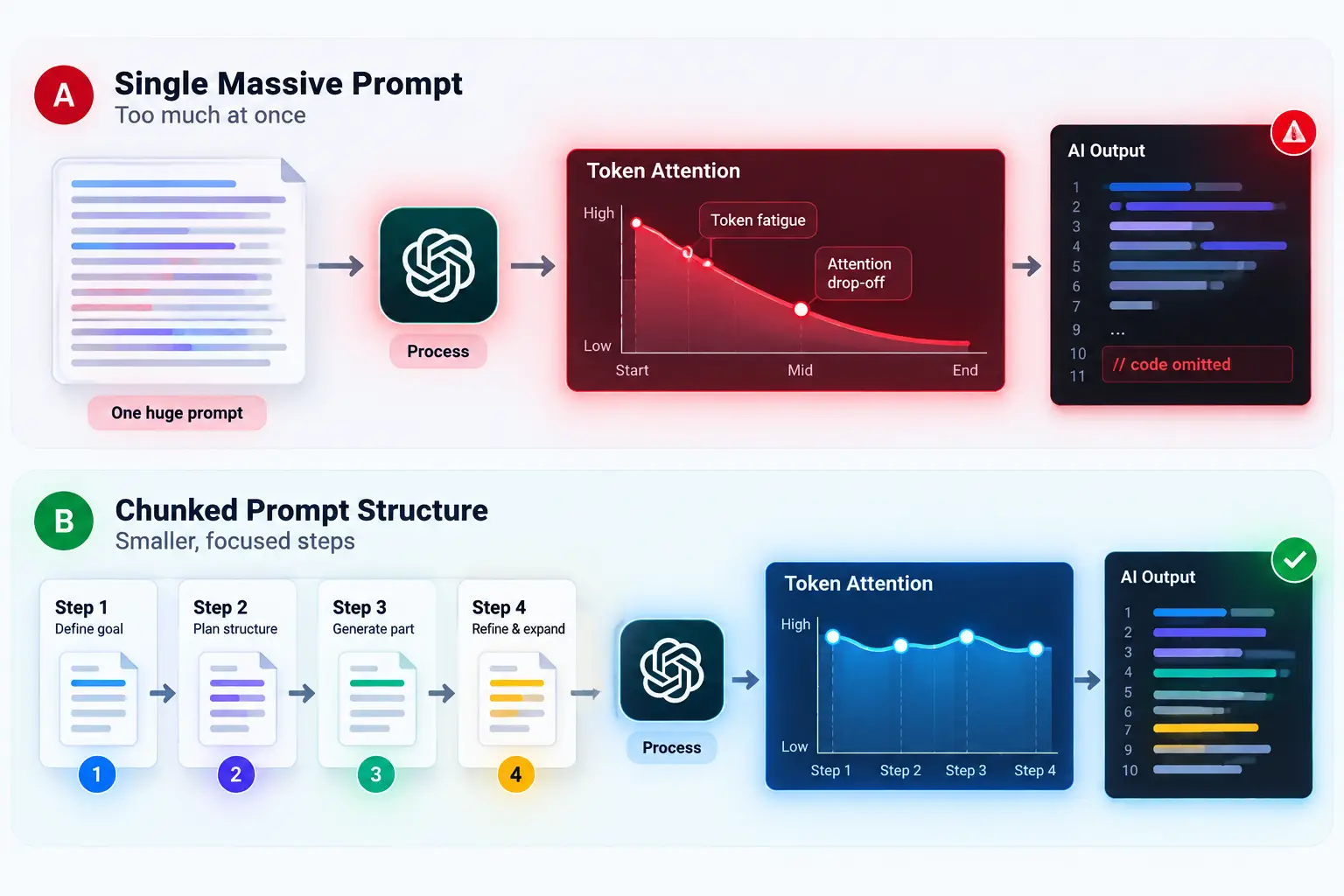
Through a mechanism known as attention, the model weighs the relevance of every token against every other token. As the response grows longer, the computational burden compounds. The model starts looking for statistical off-ramps—shortcuts that satisfy the user's basic question without continuing the computationally heavy task of generating raw, repetitive tokens.
This is why your code refactor breaks in production even though the preview looked flawless in the chat window: the model simply stopped emitting critical lines of boilerplate logic to reach an end-of-sequence token faster.
 Why AI Gets Lazy on Long Tasks (And How to Fix It)
Why Human Training Taught Models to Cut Corners
The deeper culprit behind model laziness isn't just raw compute limits—it's how models were trained to talk to people.
Most top-tier foundation models are refined using reinforcement learning from human feedback (RLHF). During this alignment phase, human evaluators grade thousands of model outputs.
Evaluators routinely reward conciseness. A crisp, 300-word summary almost always scored higher with human raters than an exhaustive, 2,000-word technical output that required horizontal scrolling and deep reading.
Former OpenAI researcher Andrej Karpathy highlighted this dynamic when discussing how language models mirror human evaluation quirks:
"LLMs don't want to succeed; they want to imitate a distribution of human text. If humans reward quick, punchy summaries, the model learns that finishing early is winning."
The model learned an uncomfortable truth: when in doubt, wrap it up. Unless you explicitly counteract that conditioning, the model will treat your full-file request as a candidate for aggressive summarization.
This is why the AI gives you high-level bullet points when you explicitly asked for complete, drop-in replacement paragraphs.
3 Common Habits That Trigger Premature Shortcuts
Most people accidentally encourage AI laziness by handing over control of the pacing. When I look at prompts that yield lazy outputs, they almost always share three structural flaws.
1. The Monolithic Assignment
Throwing a 600-line script into a chat and typing "refactor this to TypeScript" is asking for truncation. The output token limit (often capped between 4,096 and 8,192 tokens) is an absolute ceiling. When the model realizes the output cannot fit within that window without cutting code, it creates placeholders automatically.
2. Negative-Only Demands
Writing "Do not skip any functions" or "Never use placeholders" rarely works. The model's attention still lands heavily on the words "skip" and "placeholders", increasing their conceptual weight in the attention matrix.
3. Combining Planning with Execution
When you ask an AI to design an architecture and write the complete code simultaneously, it burns its cognitive bandwidth early. By the time it reaches implementation, it rushes to close the loop.
| Prompting Style | Model Behavior | Typical Result |
|---|---|---|
| Monolithic Command ("Write all 40 tests") | Scans whole file, runs out of generation runway | 4 full tests, then // add rest here |
| Negative Begging ("Please don't be lazy") | Focuses on the negative concepts | Summarized output with apologetic tone |
| Boundary-Enforced Chunking | Processes fixed batches with explicit schemas | Complete, production-grade output |
The 4-Step Framework to Force Complete Execution
To eliminate laziness, you must make cutting corners statistically harder for the model than completing the task. Here is the operational framework I use when dealing with complex, multi-stage code and data generation tasks.
User Prompt Architecture:
  ├── 1. Structural Anchor (Defines start & stop tokens)
  ├── 2. Exhaustion Clause (Bans compression syntax)
  └── 3. Chunked Execution Scope (Limits batch size)
1. Establish an "Exhaustion Contract"
Don't just plead with the model not to truncate. Provide an explicit behavioral rule that explains what to do if the task exceeds output capacity.
Try using this injection directly in your prompt:
EXECUTION RULE:
You must produce production-ready, fully written output.
Do not use placeholders, ellipsis (...), or comments indicating
omitted code (such as '// remaining logic here').

If you cannot fit the entire solution in a single response,
stop cleanly at the end of Module 2 and write:
"[PAUSED AT SECTION 2. AWAITING YOUR 'CONTINUE' PROMPT TO RESUME]"
This simple contract removes the model's incentive to invent compression shortcuts. It knows it can pause safely without failing the task.
2. Switch from Monoliths to Chained Prompts
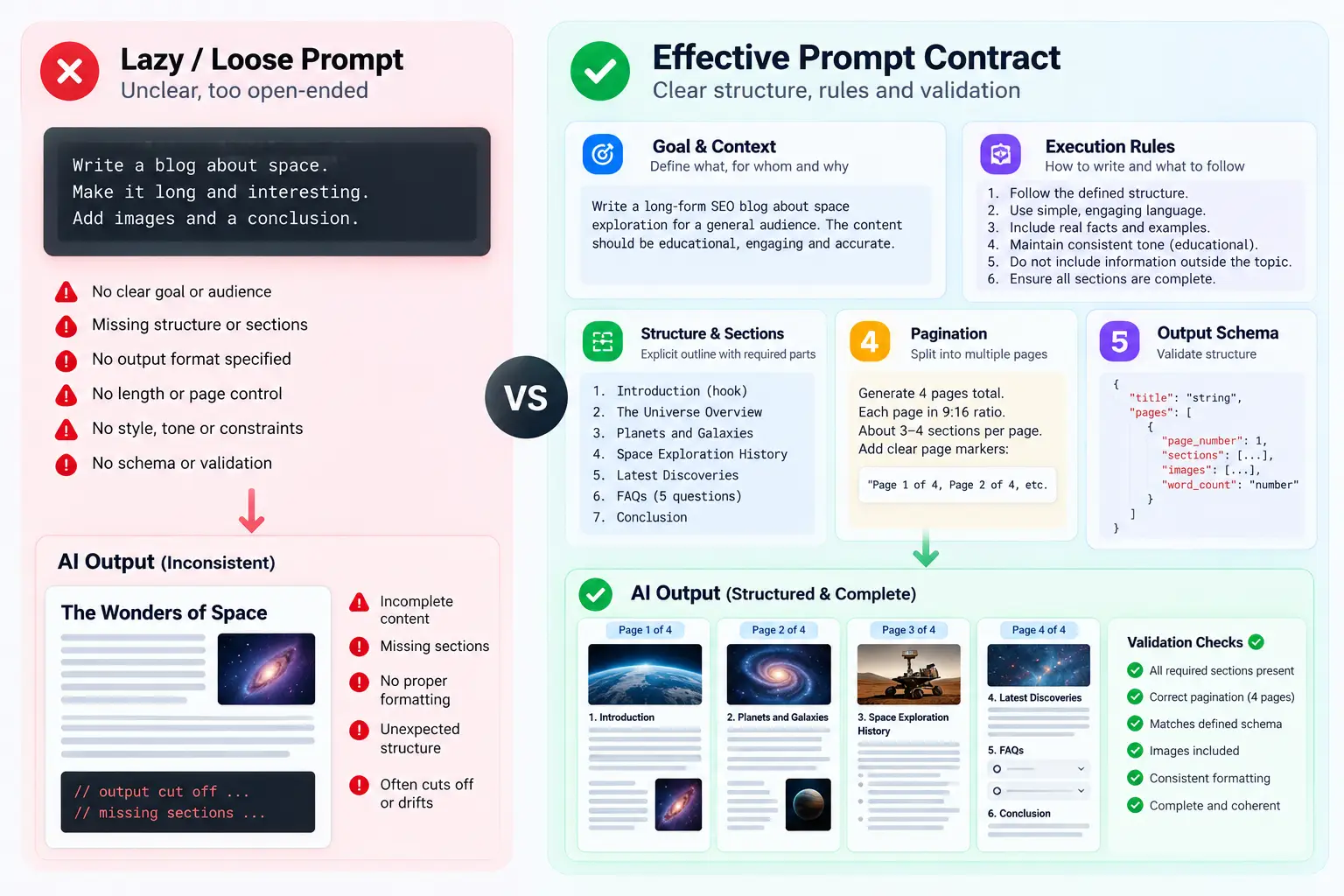
If you want deep, thorough work, abandon one-shot prompts for heavy lifts. A structured prompt chaining strategy breaks massive outputs into discrete, manageable payloads.
Instead of: "Analyze these 25 customer transcripts and pull out all bugs."
Run this workflow instead:
- Call 1: Index and group the transcripts into five functional clusters.
- Call 2: Extract raw failure events from Cluster 1 only.
- Call 3: Transform those events into verified bug tickets.
This is why your teammate's AI output looks dramatically more comprehensive than yours: they aren't using a smarter model; they are running smaller, tighter generation loops.
 Why AI Gets Lazy on Long Tasks (And How to Fix It)
3. Enforce a Strict Output Schema
When an AI outputs unstructured markdown or freeform code, it chooses its own pacing. When you lock it into a strict programmatic structure, skipping steps breaks validation.
If you are extracting data or rewriting functions, demand a structured JSON format with required fields:
[
  {
    "id": 1,
    "target_function": "calculateInterestRate",
    "full_replacement_code": "export function calculateInterestRate(...) { ... }",
    "verification_status": "complete"
  }
]
When an LLM must fill an itemized schema, it cannot casually write // etc without invalidating the JSON array.
4. Isolate Generation from Review
When executing long projects, separate the creator from the auditor. If you let a model summarize its own work in the same session, you risk running into context drift across extended chats.
Build a dedicated multi-step AI workflow where one prompt generates raw components, and a fresh instance checks the output against your source files for missing functions.
Stop Begging, Start Architecting
AI models will always take the shortest statistical path between your prompt and the end token. If you leave open a trail of shortcuts, summaries, and ellipses, the model will take it every single time.
The next time an AI leaves you hanging with // rest of logic here, don't write an angry follow-up prompt. Restructure the task. Limit the scope per message, establish a clear exhaustion clause, and let the model work in focused, high-precision bursts.
If you're already using AI daily, one workflow change this week could save you hours. Start with the smallest one: add a pause token to your next complex prompt and watch the quality immediately stabilize.
Frequently asked questions
Does increasing the temperature setting stop AI laziness?
Why does the model say it finished when half the file is missing?
Is AI laziness worse in reasoning models like o1 or Claude 3.5 Sonnet?
What is the easiest one-line prompt fix to prevent code omission?
We build VirtuaChat and write about getting real work done with AI — prompting, models, images and audio.