
You write a 400-word prompt containing eight instructions. You ask the model to analyze data, draft an outline, match your brand tone, write a 1,500-word piece, and format the output as clean markdown.
You hit send with high expectations. What comes back is a rushed, generic summary that skipped half your instructions and ignored your tone completely.
I spent months doing this exact thing. I thought stacking more rules into a single prompt made me an advanced user. In reality, I was setting the model up to fail.
The secret to reliable, publication-grade outputs isn't writing longer instructions. It is breaking the task into sequential steps—an architecture known as prompt chaining.
The Cognitive Bottleneck of Mega-Prompts
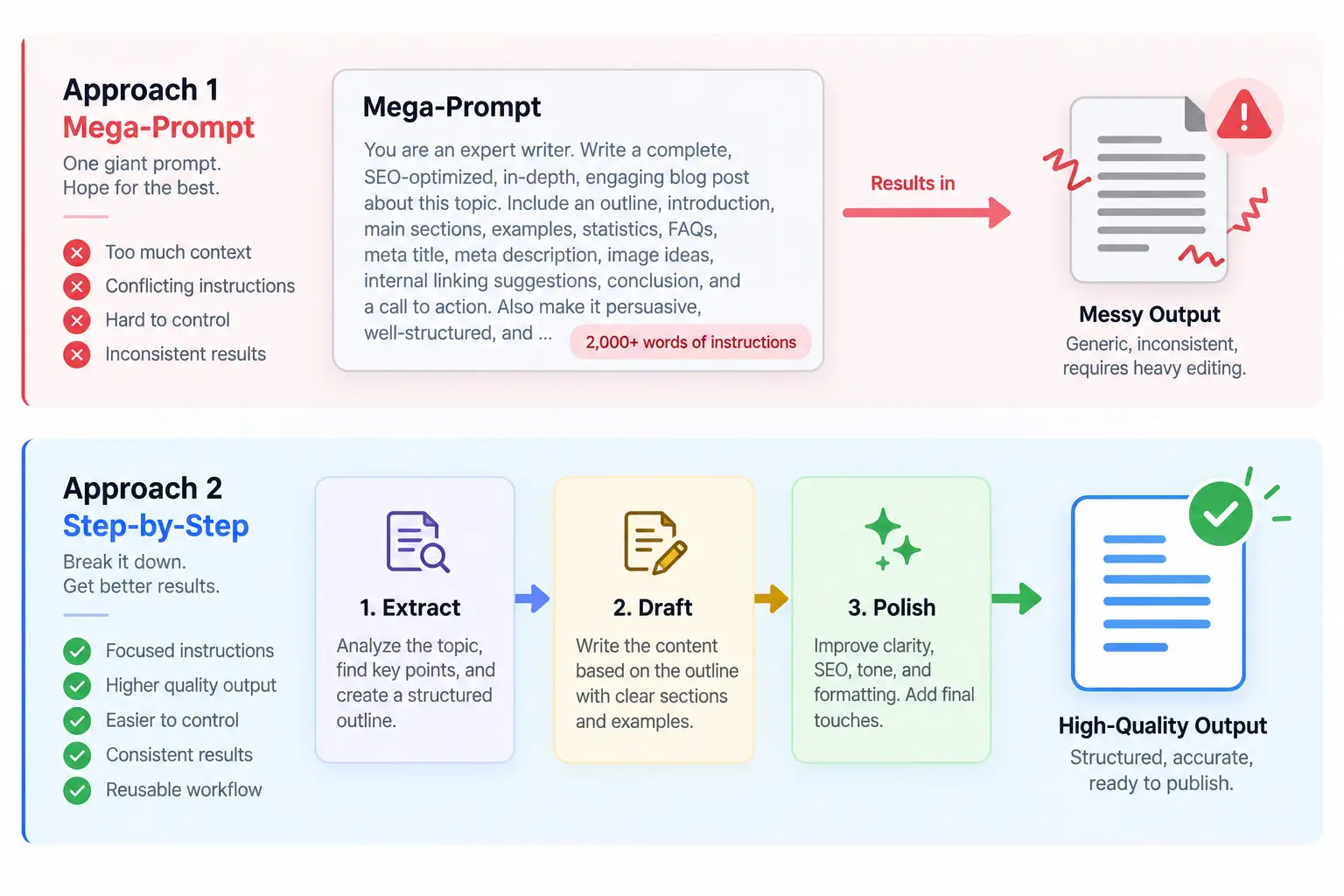
Large language models don't think like human project managers. When you dump an entire workflow into a single message, the model tries to solve every objective simultaneously within the same generation pass.
Under the hood, natural language processing models assign attention weights across the tokens you provide. The more competing tasks you introduce at once, the more diluted those attention weights become.
This is why your AI draft feels shallow and glosses over your most crucial constraints.
When you force an AI to plan, draft, refine, and format in one breath, it takes shortcuts. It sacrifices nuance to satisfy basic completion criteria.
Ethan Mollick, an AI researcher and professor at Wharton, has often emphasized that getting high-quality work out of AI requires treating it like an intern: giving iterative tasks with immediate feedback loops rather than dropping an entire binder on its desk.
Single Prompt vs. Prompt Chain
| Dimension | The Mega-Prompt Approach | The Prompt Chaining Approach |
|---|---|---|
| Output Depth | Broad, surface-level coverage | Highly detailed, focused execution |
| Instruction Adherence | Misses 20–40% of complex constraints | Catches 95%+ of targeted guidelines |
| Error Correction | Requires regenerating the whole piece | Fixes isolated steps instantly |
| Token Efficiency | High waste due to frequent rerolls | Predictable token spend per step |
 Why Prompt Chaining Beats One Giant Prompt Every Time
How Prompt Chaining Actually Works
Prompt chaining is simple: the output of Step 1 becomes the direct input for Step 2. You isolate each cognitive milestone so the model can apply 100% of its attention to one problem at a time.
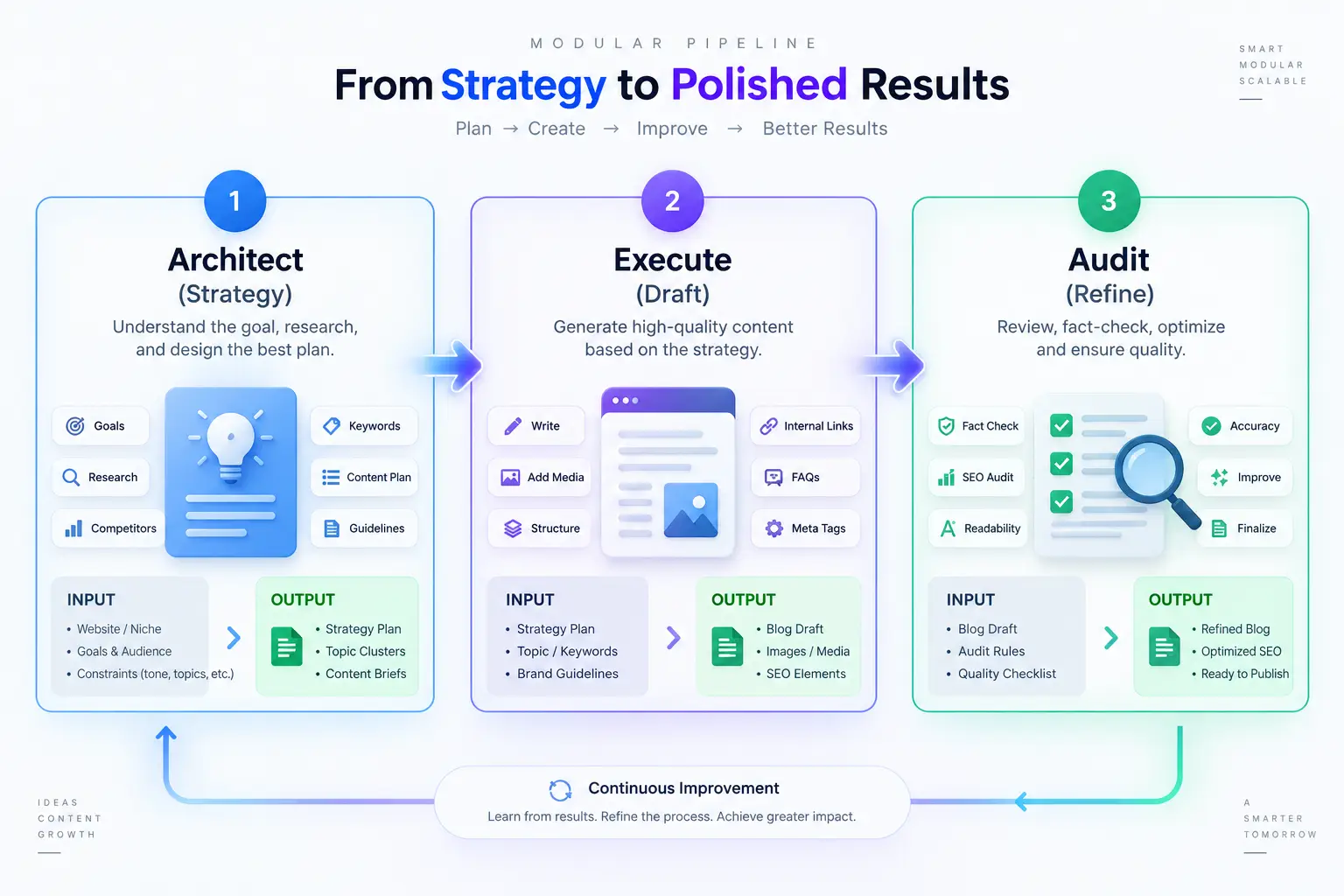
I organize most production chains into three distinct phases:
- Extraction & Architecture: Gather facts, establish structure, and set boundaries.
- Drafting: Generate raw substance without worrying about polish.
- Refinement & Formatting: Apply style guidelines, enforce voice, and format the layout.
This is why your teammate's AI output looks significantly better than yours: they aren't using a magic model; they simply refuse to ask for the final draft on turn one.
Instead of writing a massive instruction set, you guide the context incrementally. If you have struggled with context drift in long conversations, chaining acts as an anchor that prevents the model from wandering off-topic.
A Real-World 3-Step Chaining Template
Let's look at how this works when building a strategic customer onboarding email sequence.
Instead of asking for all three emails, subject lines, and value props in one prompt, split the run into three distinct prompts.
Step 1: Establish the Strategy
First, force the model to outline the core friction points before drafting a single sentence.
Here is our product description and target customer persona:
[Insert brief product details and audience]

Identify the top 3 friction points this user faces in their first 48 hours.
For each friction point, provide one concrete action the user must take to reach their "aha" moment.
Do not write emails yet. Return only the friction points and actions.
Review the response. If friction point two feels weak, edit it right there. You have caught a structural flaw before wasting time generating hundreds of words.
Step 2: Draft the Content
Now pass the validated strategy into the drafting phase.
Based strictly on the 3 friction points and actions we just identified, draft Email 1.
Goal: Get the user to complete Action 1.
Keep the word count under 150 words. Focus entirely on utility, not marketing hype.
This is why your drafts stop sounding generic: the model builds on validated, custom foundations instead of pulling generalized platitudes from its broader training corpus.
If you enjoy working collaboratively with models this way, you can even make AI interview you during this initial step to pull out hidden details.
Step 3: Polish and Audit
Finally, run the draft through a critical editorial filter.
Here is the draft:
[Insert generated Email 1]

Audit this draft against these criteria:
1. Is the call-to-action unmistakable?
2. Does it sound like human advice rather than a marketing newsletter?
Rewrite the email to fix any issues found. Present the final email cleanly.
By separating critique from drafting, you tap directly into the logic underlying chain-of-thought prompting. You give the AI room to inspect the text before finalizing it.
 Why Prompt Chaining Beats One Giant Prompt Every Time
Managing Context Windows Across Steps
When chaining prompts, you need to monitor your context window.
Many users assume keeping everything in one continuous chat window is always ideal. However, old conversational noise can slowly degrade reasoning quality over multiple turns.
Whenever I finish a major phase of a project, I grab the distilled output from Step 1 and Step 2, open a fresh session, and use it as the clean starting context.
Pairing this discipline with the ability to write system prompts that actually work gives you an unbeatable production system.
This is why your multi-turn chat sessions often derail after the fifth question: accumulated token noise introduces subtle conflicting instructions that distract the model.
Build Small Chains Before Big Automations
You don't need a complex automation tool or Python script to harness prompt chaining. You can do it manually right now in any chat interface.
Start tomorrow with your next complex assignment. Resist the impulse to paste your usual three-paragraph mega-prompt.
Ask for the outline first. Review it. Then ask for section one. The jump in clarity, depth, and precision will surprise you.
Frequently asked questions
Does prompt chaining consume more tokens than a single prompt?
When should I still use a single prompt instead of a chain?
Can I automate prompt chains without writing code?
Should I use the same AI model for every step in the chain?
We build VirtuaChat and write about getting real work done with AI — prompting, models, images and audio.