
You paste a master prompt into your AI chat at 9:00 AM.
By 10:30 AM, after twenty back-and-forth turns, the model starts ignoring your strict formatting constraints and giving advice that directly contradicts what you established in turn three.
I used to think this was a random glitch or a temporary server degradation.
It isn't. You are watching a predictable architectural phenomenon called context drift—also known as context rot—taking place in real time.
When you push a conversation past its natural memory limits, the model does not run out of room. It simply becomes blind to the rules you set at the start.
This is why your long coding session suddenly breaks halfway through.
What Actually Happens Inside the Context Window
To understand why your prompts degrade, you have to look at how modern large language models handle memory.
Every modern LLM relies on a Transformer architecture powered by an Attention mechanism.
Unlike humans, who store memories dynamically in flexible neural pathways, an AI recalculates the relationship between every single token in the chat history every time you hit send.
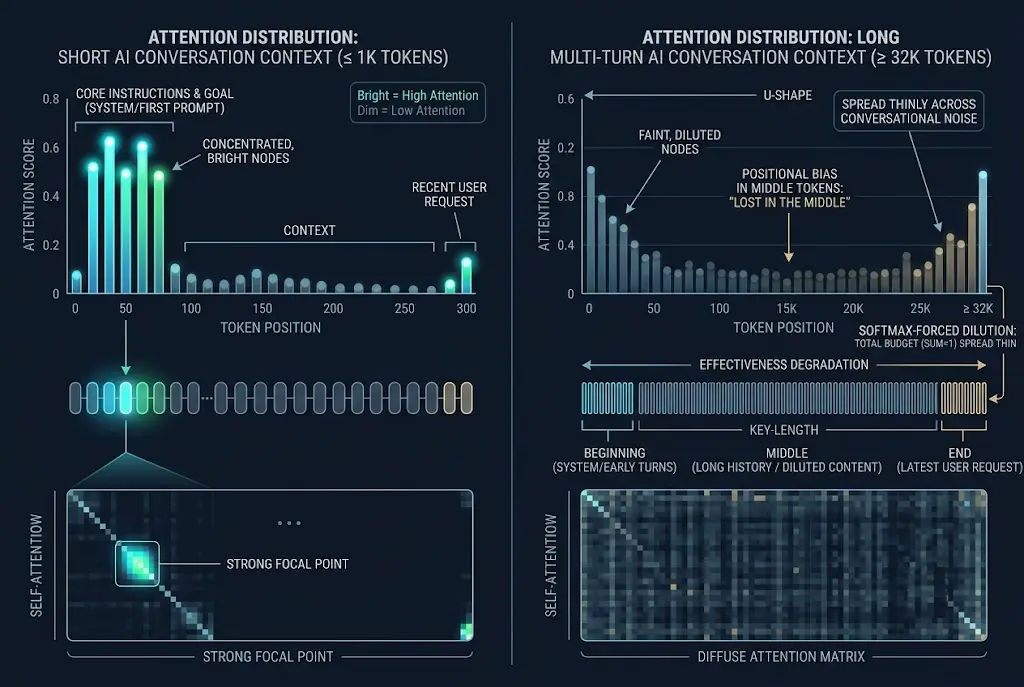
When a thread is short, key instructions receive high mathematical focus.
As your conversation grows to thousands of words, three structural issues begin to destroy output quality.
1. Attention Dilution
In a standard attention matrix, attention weights must sum to 1.0.
In a 500-token prompt, your core system instructions might hold 15% of the total attention weight.
In a 30,000-token conversation, those exact same system instructions might hold less than 0.5% of the total attention weight.
This is why your initial prompt rules get silently replaced by conversational fluff.
2. Positional Bias (The "Lost-in-the-Middle" Effect)
Researchers have repeatedly documented that frontier models excel at retrieving information placed at the absolute start or absolute end of a context stream.
Information buried in the middle drops in retrieval accuracy by up to 35%.
In a 25-turn thread, turn 3 through turn 20 is "the middle." That is where your architectural constraints and design decisions go to die.
3. Distractor Interference
Every turn adds conversational artifacts—polite transitions, temporary code attempts, and clarified misunderstandings.
The model treats all past tokens as potential evidence for what to generate next.
If turn six contained a flawed coding logic that you spent three messages fixing, the model still "sees" that flawed logic inside its active context window.
This is why your teammate's fresh thread generates clean code while your 45-minute thread keeps reintroducing resolved bugs.
 How to Stop AI Context Drift in Long Conversations
3 Telltale Signals Your Session Has Context Drift
When I evaluate multi-turn workflows, I watch for three distinct symptoms indicating the active thread is contaminated.
- Tone Flattening: The model abandons assigned persona traits and reverts to default, wordy AI conversational templates.
- Negative Constraint Failure: Instructions like "do not use external libraries" or "keep answers under three sentences" stop working entirely.
- Recency Bias Anchoring: The AI over-indexes on whatever you discussed in the last two messages, forgetting foundational rules established earlier.
If you notice any of these signals, sending more follow-up corrections inside the same thread will only make things worse.
You are adding more tokens to an already noisy attention pool.
This is why switching models or restarting a thread feels like getting a fresh developer on the team.
4 Strategies to Keep AI Output Sharp
You do not have to settle for degraded output during complex, multi-stage projects.
I use four practical tactics to maintain precise model outputs regardless of thread length.
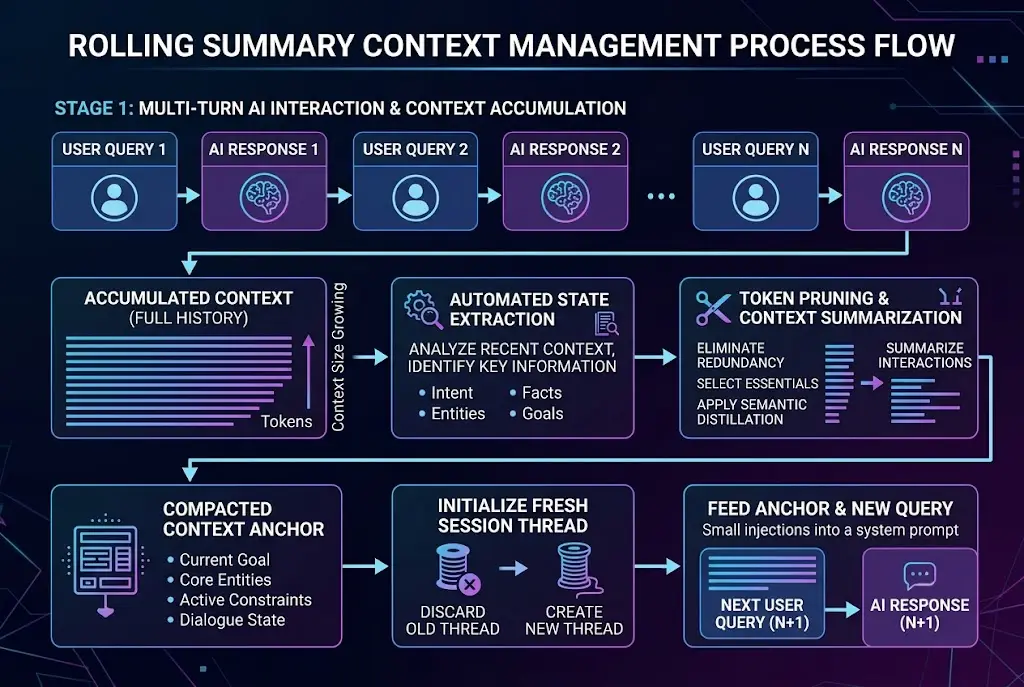
Strategy 1: Implement State Compression
Instead of letting a conversation balloon endlessly, periodically ask the model to compile a state checkpoint.
When a thread reaches 10–12 turns, prompt the model to extract key facts, active constraints, and current task status into a structured block.
[PROJECT STATE CHECKPOINT]
- Core Objective: Build a REST API in Rust
- Fixed Architecture: Tokio + Axum + PostgreSQL
- Approved Schema: User, Workspace, Session models
- Active Task: Writing JWT authentication middleware
- Forbidden Approaches: No ORM usage, no unwraps in handler code
Copy that block, open a clean thread, and paste it alongside your next action item.
You instantly shed thousands of distracting historical tokens while retaining 100% of the operational context.
Strategy 2: Modular Thread Workflows
Never run research, architectural planning, and code implementation in a single continuous chat window.
When I manage complex technical builds, I separate my workflow into distinct modules.
I do initial brainstorming in one session, summarize the results, and bring only the finalized specification into a fresh execution thread.
If you are struggling with complex multi-prompt projects, learning how to structure mastering multi-step AI projects will transform how quickly you ship features.
 How to Stop AI Context Drift in Long Conversations
Strategy 3: End-Anchored Rule Injection
Because transformer models exhibit strong recency bias, place your most strict behavioral rules at the end of your prompt, not just at the top.
If you have a critical constraint—such as output formatting or specific API rules—repeat it right above your latest instruction.
... [Insert project background and task context] ...

CRITICAL CONSTRAINT REPEAT:
Return ONLY valid JSON. Do not include markdown code blocks, intro text, or conversational sign-offs.
This is why anchoring key rules at the tail end of your latest prompt yields instant formatting compliance.
Strategy 4: Know When to Switch Models
Different models handle long-context degradation with varying levels of resilience.
Some architectures maintain high retention across 100,000 tokens, while others experience noticeable attention drift around 8,000 tokens.
If your thread requires searching through massive raw text logs, choose high-retention models built for large retrieval tasks.
Understanding when to switch AI models allows you to match task complexity to the engine best equipped to handle it without output degradation.
Quick Comparison: Thread Management Tactics
| Tactic | Token Overhead | Risk of Context Drift | Best Used For |
|---|---|---|---|
| Single Thread (Continuous) | High | Critical (High) | Quick Q&A, short ideation sessions |
| Rolling Summaries | Low | Very Low | Complex coding, long writing builds |
| Modular Threads | Minimal | Zero | System architecture, multi-stage projects |
| Tail Anchor Prompts | Minimal | Low | Enforcing strict JSON/code formatting |
How to Test This in Your Workflow Right Now
The next time you catch an AI assistant forgetting your formatting guidelines or repeating previously fixed errors, stop arguing with it in the existing chat window.
Ask the model for a 3-bullet summary of your current progress and active rules.
Copy those three bullets into a brand-new thread, re-apply your baseline instructions, and run your query again.
You will see an immediate jump in precision, speed, and instruction following.
If you are already using AI daily, making state compaction a habit this week will save you hours of unnecessary prompt editing. Start with your very next long chat thread.
Frequently asked questions
Does a larger context window eliminate context drift entirely?
How often should I reset my AI conversation thread?
Why do negative constraints break down first during long sessions?
Can dynamic model selection reduce context rot issues?
We build VirtuaChat and write about getting real work done with AI — prompting, models, images and audio.