
You’ve seen it happen. A teammate shares a brilliant AI prompt in a Slack channel. Someone else copies it, tweaks a word, gets a slightly different result. Another person tries it weeks later, and the output is just…off. Pretty soon, that initial spark of AI efficiency turns into a messy game of prompt telephone, leaving your team with inconsistent outputs and lost productivity.
I've been there. I used to think the problem was our AI literacy, or maybe the models themselves. But after countless fragmented conversations and wildly varying AI outputs across projects, I realized the real culprit: our ad-hoc approach to sharing AI knowledge. Sharing prompts via chat is a productivity trap. It creates information silos, makes version control impossible, and ultimately stifles true team collaboration with AI.
The Hidden Cost of Fragmented AI Prompt Sharing
When I first started integrating AI into team workflows, our approach was simple: "Got a good prompt? Drop it in #ai-ideas!" Sounded good on paper, right? But the reality quickly revealed itself.
The Whisper Game of AI Prompts
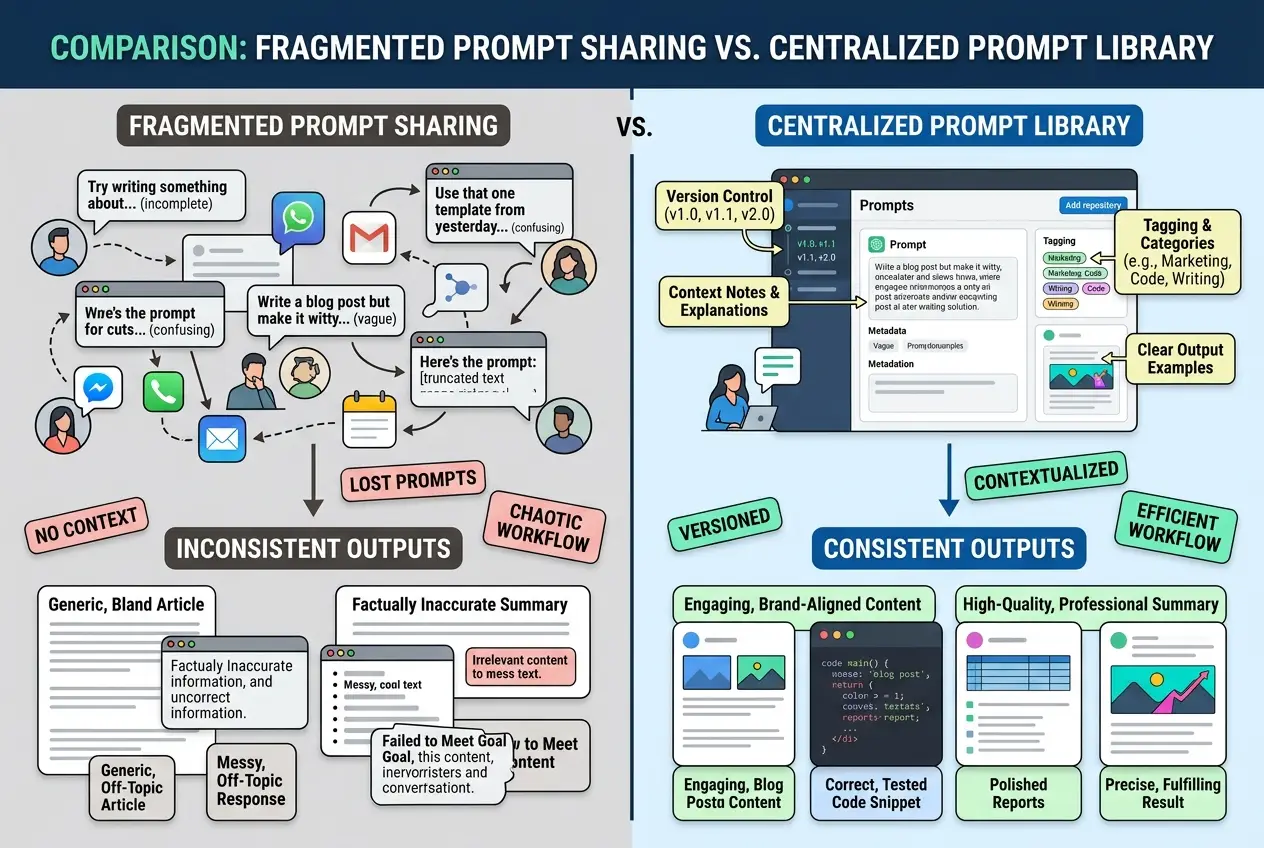
Think about it like the children's game of telephone. One person whispers a message, and by the time it reaches the last person, it's completely changed. The same happens with AI prompts. A great prompt shared in a chat can be:
- Copied incorrectly.
- Misunderstood due to lack of context.
- Tweaked for a one-off task, then the "original" is lost.
- Simply buried under a hundred new messages, never to be found again.
This is why your team’s AI output feels like a lottery. You're not working from a shared playbook; you're playing a guessing game.
Version Control Nightmare
Every prompt is a piece of code. And just like code, prompts evolve. You test, you refine, you discover nuances. But in a chat-based system, how do you track those iterations? What’s the "latest" version? Which prompt produced that amazing result last month? Without proper version control, your team is constantly reinventing the wheel, losing valuable iterations, and struggling to reproduce successful outputs. I once spent an hour trying to find a prompt I knew produced a specific tone, only to realize a minor tweak had been made and documented nowhere.
Context is King (and Often Missing)
A prompt isn't just the text itself. It's the model it was used with, the specific parameters, the desired output format, and the why behind it. Sharing "Hey, try this for blog intros" in Slack misses all that crucial context. This is why your teammate’s AI output seems better than yours, even with the same prompt. They likely understood the subtle context you missed because it wasn't explicitly documented. Without that context, prompts are less effective, leading to frustration and underutilized AI capabilities. This directly impacts knowledge management within your team.
 Stop Sharing AI Prompts in Slack (Do This Instead)
The Solution: A Centralized, Collaborative AI Prompt Workspace
So, if Slack isn't the answer for sharing AI prompts effectively, what is? The answer lies in treating your AI prompts like a critical asset, not just ephemeral chat messages. You need a centralized, searchable, and collaborative workspace.
I'm talking about a dedicated platform where prompts are not just shared, but managed.
Build a Living Prompt Library
Imagine a single source of truth for all your team's AI prompts. This isn't just a document; it's a dynamic library where:
- Prompts are categorized: By task (e.g., "Marketing Copy," "Code Debugging," "Image Generation"), by model (GPT-4, Claude, DALL-E), or by project.
- Context is embedded: Each prompt includes notes on its purpose, best practices, target audience, and even examples of good and bad outputs.
- Version history is tracked: See how a prompt evolved, who made changes, and why. This is crucial for iterating and improving.
- Team feedback is integrated: Comment sections or rating systems allow teammates to suggest improvements or flag issues.
This approach transforms prompt sharing from a chaotic exercise into a strategic organizational learning process. It also helps prevent information silos that often plague growing teams.
Integrating Prompt Engineering Best Practices
A collaborative workspace is also the perfect place to bake in prompt engineering best practices. For example, instead of just sharing a prompt, you can embed a template that ensures every team member uses the optimal structure for complex tasks. This is incredibly powerful when you're trying to master multi-step AI projects.
Here’s an example of how a prompt template might look in a shared library, ensuring consistency:
**Prompt Title:** Blog Post Outline Generator
**Purpose:** To generate a comprehensive, SEO-friendly outline for a blog post based on a given topic and target keyword.
**Model Preference:** GPT-4 (for detailed structure and nuanced understanding)
**Version:** 2.1 (Last updated: 2024-10-26)

**Instructions:**
1.  **Role:** You are an expert content strategist and SEO specialist.
2.  **Task:** Generate a 5-7 section blog post outline. Each section should have 2-3 sub-points.
3.  **Tone:** Informative, engaging, and authoritative.
4.  **Keywords:** [Target Keyword] (primary), [Secondary Keyword 1], [Secondary Keyword 2]
5.  **Target Audience:** [Describe audience]
6.  **Context:** The blog aims to [Blog Goal].
7.  **Input:**
    ```
    **Blog Topic:** [Insert Blog Topic Here]
    **Target Keyword:** [Insert Primary Keyword Here]
    **Secondary Keywords:** [Comma-separated list of secondary keywords]
    **Target Audience:** [e.g., SaaS marketers, small business owners]
    **Blog Goal:** [e.g., drive sign-ups, educate on a new feature]
    ```

**Example Output:** (Link to successful blog outline example)
This level of detail dramatically reduces ambiguity and improves output quality across the board. It also makes it clear when you might want to switch AI models for different aspects of the same task.
Streamlining Team Collaboration with AI
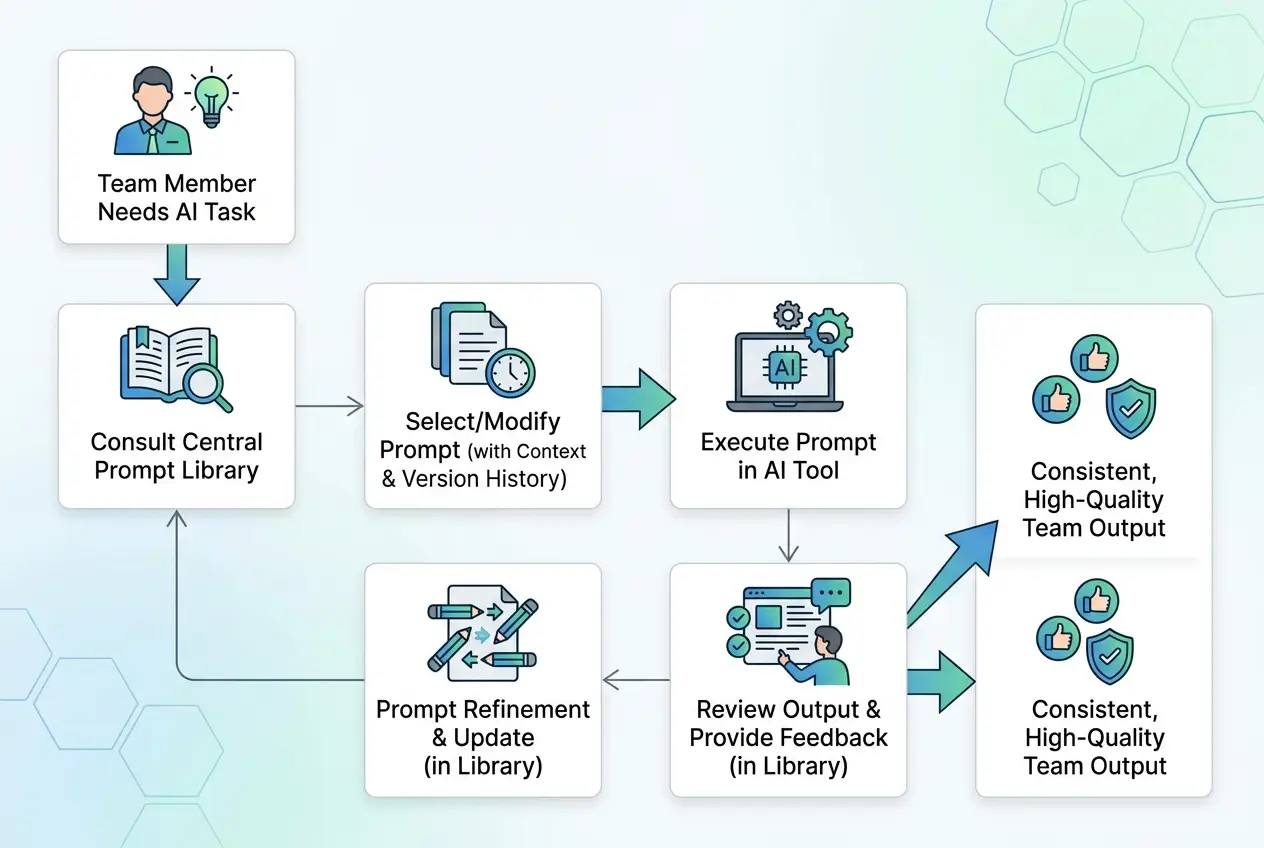
A shared workspace isn't just about prompts; it's about making AI a seamless part of your team's workflow. Imagine:
- One-click access to verified prompts: No more searching through chat history.
- Centralized feedback loop: Team members can suggest improvements to existing prompts or contribute new ones directly.
- Standardized outputs: When everyone uses the same high-quality, contextualized prompts, the AI’s output becomes more predictable and useful.
- Onboarding made easy: New team members can quickly get up to speed on your company's AI best practices and effective prompts without extensive training.
- Reduced "prompt paralysis": Knowing where to find the right prompt for a task eliminates the hesitation some users feel when starting from scratch.
When I implemented a system like this, the change was dramatic. We moved from inconsistent, hit-or-miss AI results to a predictable, high-quality flow. It wasn't about using AI more; it was about using it smarter, together. If you think you've been prompting AI wrong this whole time, then consider how your team shares prompts – that might be the biggest mistake of all.
 Stop Sharing AI Prompts in Slack (Do This Instead)
Implementing Your Collaborative AI Prompt Workspace
Ready to ditch the prompt chaos? Here's how you can start:
- Choose the Right Tool: Look for a platform that offers multi-model chat, document management, and ideally, specific features for prompt organization and sharing. It needs to be a dedicated space, not just another tab in a crowded communication app.
- Start Small: Don't try to migrate every single prompt at once. Identify 3-5 high-value, frequently used prompts that would benefit most from centralization (e.g., email drafting, meeting summaries, code snippets).
- Define Your Structure: How will you categorize prompts? What information must accompany each prompt (e.g., model, purpose, examples)? Consistency here is key.
- Train Your Team: Don't just launch it and hope for the best. Schedule a brief session to walk your team through the new system, explain the "why," and gather initial feedback. Emphasize the benefits of consistent, high-quality AI outputs for everyone.
- Encourage Contribution: Make it easy for team members to submit new prompts or suggest improvements to existing ones. The library should be a living, breathing resource, constantly growing and improving with collective input.
The shift from ad-hoc sharing to a structured, collaborative prompt workspace is more than just an organizational change; it's a fundamental upgrade to your team's collective intelligence. It ensures that every member can leverage the best of what AI has to offer, consistently and effectively. If you're already using AI daily, one workflow change this week could save you hours. Start with the smallest one.
Frequently asked questions
What types of AI prompts should we prioritize for a shared library?
How can we encourage team members to actually use the new prompt library instead of old habits?
What features should I look for in a platform to host a collaborative AI prompt workspace?
How do we maintain quality control and ensure prompts in the library are actually effective?
Can a shared prompt library also help with prompt engineering skills across the team?
We build VirtuaChat and write about getting real work done with AI — prompting, models, images and audio.