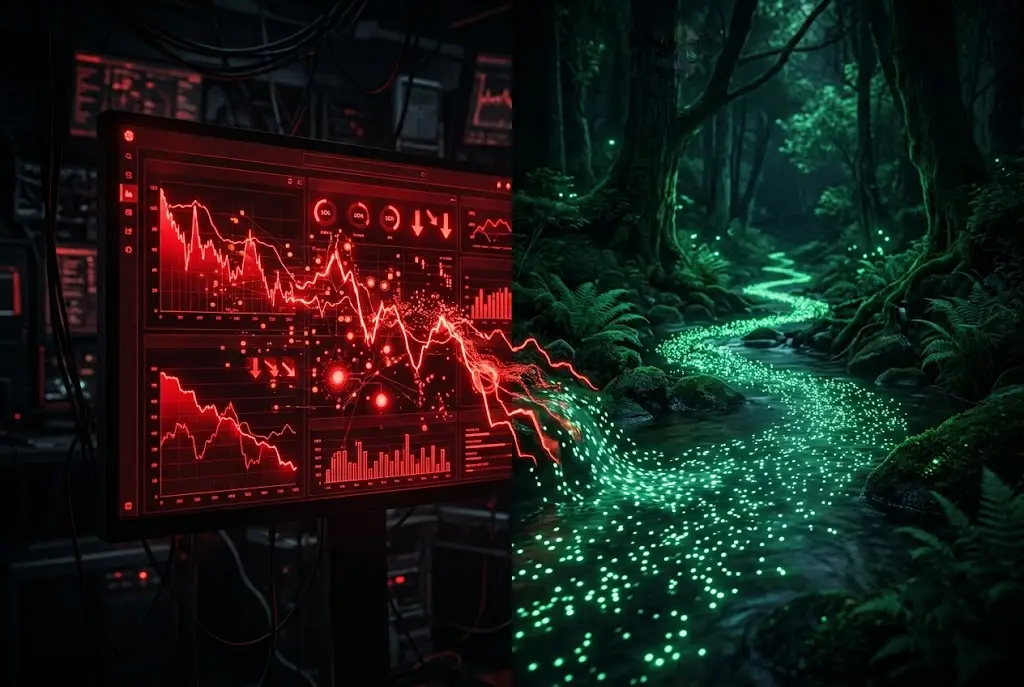
You spend twenty minutes crafting a meticulous prompt. You define the target audience, supply explicit formatting constraints, and provide three clean examples. You hit send.
The output is a complete mess. The AI hallucinates non-existent function names, ignores your strict line limits, or reads like a lifeless corporate memo.
Most people immediately blame their prompt phrasing. They rewrite the system prompt, swap out adjectives, or search for better prompt templates.
In reality, your prompt might be perfectly fine. The real culprit is sitting right in your model configuration panel: the temperature setting.
I see developers, writers, and product managers struggle with inconsistent model behavior every day simply because they treat temperature like a background detail. They leave it at the default setting and wonder why the same prompt gives different results every single time.
If you want predictable, high-quality results from artificial intelligence, you need to understand what happens under the hood when you move that thermal slider.
How Temperature Alters Token Selection
Large language models do not write sentences as complete thoughts. They operate as hyper-advanced probability engines, choosing text one token at a time.
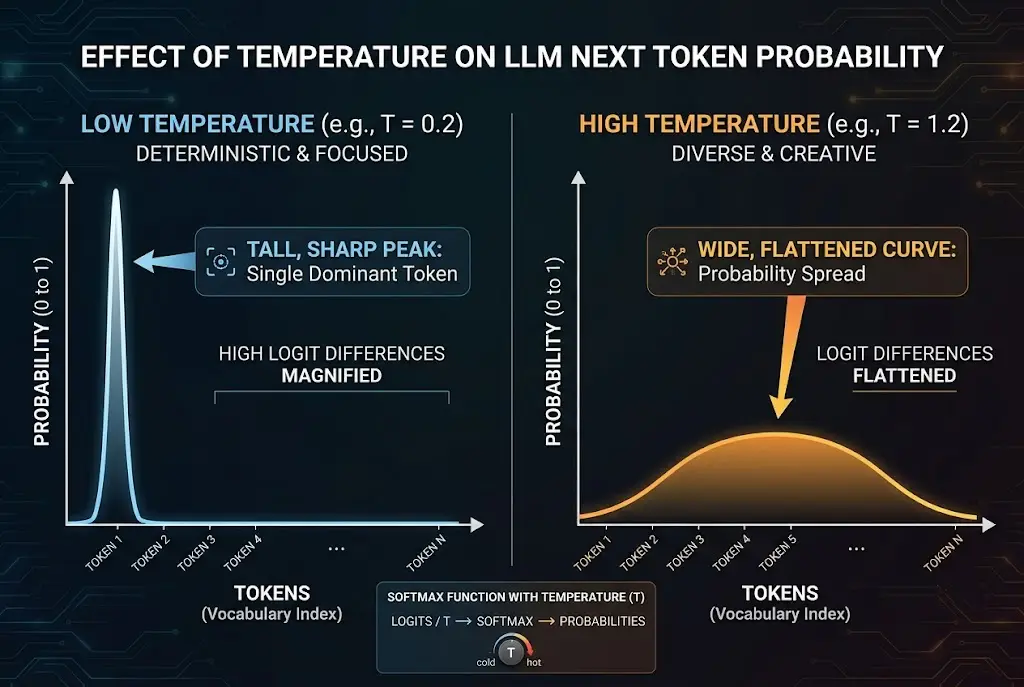
When an LLM prepares to generate the next word in a sequence, it assigns a raw score—called a logit—to tens of thousands of candidate tokens in its vocabulary. High scores go to logically sound completions, while low scores go to unrelated terms.
To turn these raw logits into actual percentages, the model applies a mathematical function called softmax. This creates a probability distribution where all candidate scores add up to 100%.
Input: "The quick brown fox jumps over the..."

Logit Scores before Temperature:
- "lazy"  -> 4.5
- "dog"   -> 4.2
- "fence" -> 2.1
- "moon"  -> -0.5
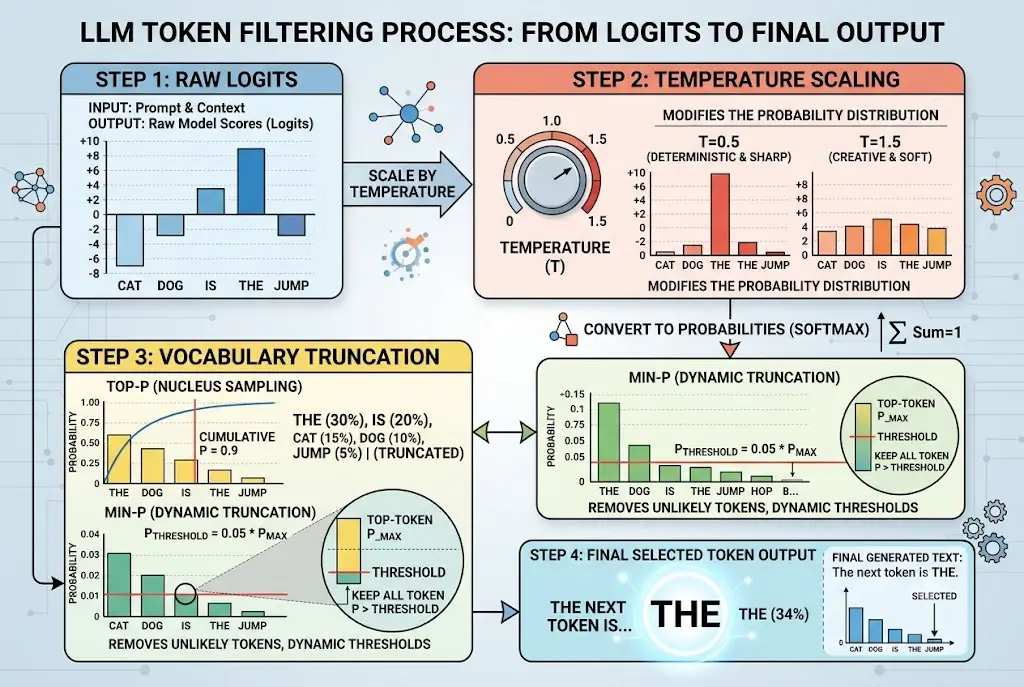
Temperature is a mathematical scaling factor applied directly to those logits before softmax normalization takes place. When you divide a logit score by a lower temperature number, high-probability tokens expand their lead dramatically. When you divide by a higher number, the differences between top candidate choices shrink.
As noted in Signal & Syntax's guide on temperature and top-p sampling, temperature does not actually make an AI model smarter or dumber—it simply dictates how much the model trusts its own primary statistical instinct.
This is why setting a temperature of 1.0 during structured JSON extraction causes silent parsing failures; the model occasionally selects low-ranked brackets or misplaced quotes.
| Temperature Level | Probability Distribution Shape | Model Behavior | Best Use Case |
|---|---|---|---|
| 0.0 - 0.2 (Cold) | Sharply peaked on top token | Deterministic, highly predictable, repetitive | Coding, math, JSON, data extraction |
| 0.5 - 0.7 (Warm) | Balanced curve with top candidates | Structured yet natural phrasing | Technical blogs, summaries, documentation |
| 0.8 - 1.2 (Hot) | Flattened across wider vocabulary | Exploratory, surprising, occasionally wild | Brainstorming, fiction, creative hooks |
 Why AI Temperature Settings Ruin Your Prompts
Why Default Settings Fail Your Daily Workflows
Most popular AI chat interfaces default to a balanced temperature between 0.7 and 1.0. Tech platforms select this sweet spot because it makes conversational AI feel fluid, human-like, and creative during general Q&A sessions.
However, a default intended for casual chatting is terrible for specialized tasks.
If you ask an AI model to refactor a complex Python script at temperature 0.8, it will occasionally introduce non-existent method signatures just to vary its output. Conversely, if you force a model to write a catchy marketing tagline at temperature 0.1, it will regurgitate predictable clichés because it refuses to venture beyond the highest-probability tokens.
I ran into this exact barrier while building structured data pipelines. We were feeding long customer transcripts into an LLM to extract structured tags. At default temperature settings, roughly 8% of the API calls returned malformed JSON objects that crashed our database.
Dropping the temperature to 0.0 eliminated the syntax errors overnight without changing a single word in our prompt.
This is why your teammate’s code refactoring prompt yields razor-sharp syntax while yours keeps hallucinating non-existent library imports.
If you are struggling with robotic phrasing in high-temperature drafts, the root issue might actually be stylistic. Check out our guide on why AI writing sounds robotic and how to fix it to pair proper sampling parameters with strong tone guidelines.
Combining Temperature with Top-P and Min-P
Temperature is not the only knob controlling model output randomness. To master output quality, you must understand how temperature interacts with Top-P (Nucleus Sampling) and newer dynamic parameters like Min-P.
While temperature reshapes the probability curve across the entire vocabulary, Top-P acts as a cut-off filter. A Top-P setting of 0.9 orders all candidate tokens from highest to lowest probability and discards everything outside the top 90% cumulative pool.
{
  "model": "gpt-4o",
  "messages": [
    {"role": "system", "content": "You are a precise technical data extractor."},
    {"role": "user", "content": "Extract all key-value pairs from the attached log."}
  ],
  "temperature": 0.1,
  "top_p": 0.95,
  "presence_penalty": 0.0,
  "frequency_penalty": 0.0
}
If you dial up the temperature to encourage creative storytelling, but leave Top-P set to 0.1, you restrict the model to a tiny subset of candidate tokens. The result is a bizarre hybrid: the model tries to take creative risks, but lacks the candidate vocabulary to execute them naturally.
Researchers published groundbreaking findings on arXiv regarding Min-P sampling, demonstrating that dynamic truncation based on the top token's relative confidence produces far more coherent creative text than fixed nucleus sampling.
Min-P sets a relative threshold based on the top candidate's probability. If your top word has a 60% probability and Min-P is set to 0.05, any word with less than 3% probability (5% of 60%) gets cut instantly.
This is why adjusting temperature without tuning nucleus sampling leaves your multi-step workflows feeling erratic and unpredictable.
When building advanced pipelines, combining temperature adjustments with strict system instructions is vital. Read our practical breakdown on how to write system prompts that actually work to lock down model instructions at the architecture level.
 Why AI Temperature Settings Ruin Your Prompts
The Optimal Parameter Cheat Sheet
Stop guessing which settings to use when sending requests to OpenAI, Anthropic, or open-source models like Llama.
Instead of relying on luck, match your hyperparameter configuration directly to your generation task using this quick reference guide based on Prompt Engineering Guide's LLM parameter benchmarks.
Precise & Deterministic Tasks
- Tasks: Coding, SQL generation, JSON parsing, mathematical proofing, translation.
- Temperature:
0.0–0.2 - Top-P:
0.95or1.0 - Why: You want the model to select the single most mathematically confident token at every step.
Balanced Business Tasks
- Tasks: Customer support replies, technical blog posts, executive summaries, email drafts.
- Temperature:
0.5–0.7 - Top-P:
0.9 - Why: Provides enough stylistic variation to sound conversational without deviating from factual context.
High-Creativity Brainstorming
- Tasks: Ad creative headlines, fiction writing, naming concepts, multi-angle ideation.
- Temperature:
0.85–1.1 - Top-P:
0.95(or useMin-P: 0.05where supported) - Why: Flattens candidate probabilities to surface unexpected vocabulary choices and novel structural connections.
Take Control of Your Model Outputs
The next time an AI output falls short of your expectations, resist the urge to spend thirty minutes tweaking your prompt adjectives.
Look at your parameter panel first. If you are asking for exact analytical outputs at a high temperature, no amount of prompt engineering will stop the model from taking probabilistic leaps.
If you use AI tools daily, changing one hyperparameter default this week could instantly salvage your broken workflows. Start by dropping your temperature to zero on your next data task and see the difference immediately.
Frequently asked questions
Does setting temperature to 0.0 make an AI model 100% deterministic?
Should I adjust both Temperature and Top-P at the same time?
Why don't simple web interfaces like standard ChatGPT show a temperature slider?
How does temperature affect API cost and token usage?
We build VirtuaChat and write about getting real work done with AI — prompting, models, images and audio.