
You paste a 2,000-word document into your prompt window, tuck a crucial formatting constraint into paragraph four, and hit send.
The AI gives you an answer that looks structured, confident, and articulate. There is only one problem: it completely ignored paragraph four.
I spent months assuming I was just phrasing my mid-prompt instructions poorly. I reworded them. I added capitalization. I even wrote phrases like “IMPORTANT: DO NOT SKIP THIS”. Nothing worked consistently.
The issue was not my phrasing. It was a fundamental architectural limitation in how neural networks process long text sequences. Once you understand why it happens, you can redesign how you feed data into AI tools and get reliable outputs on the first try.
The U-Shaped Attention Trap
Language models do not read documents the way humans do. When you feed a long context window into a transformer, the underlying attention mechanism allocates computational focus unevenly across the prompt.
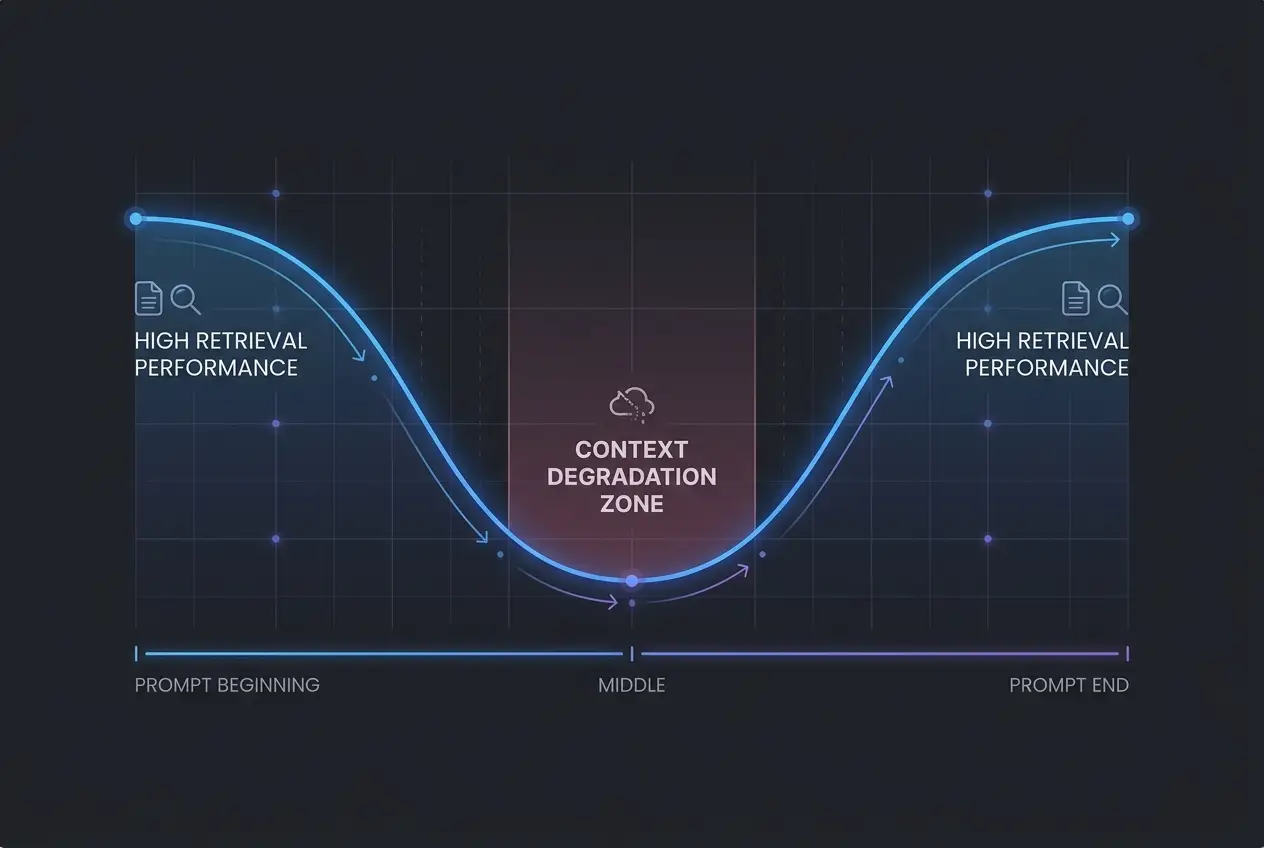
Researchers call this phenomenon the “Lost in the Middle” effect. Modern large language models demonstrate high retrieval accuracy for information placed at the very beginning of a prompt (the primacy effect) and near the very end (the recency effect).
The middle 60% of your prompt suffers from a dramatic drop in retrieval performance.
This is why your pasted meeting transcript produces summary notes that miss the single most contentious argument discussed at the 25-minute mark.
Model Attention Accuracy Across Context Position
High Attention  | \                                /
                |  \                              /
Medium Attention|   \                            /
                |    \                          /
Low Attention   |     \________________________/
                +----------------------------------
                 Start (Primacy)  Middle   End (Recency)
Stanford and UC Berkeley researchers demonstrated that even models boasting context windows of 128k to 2M tokens experience this attention trough when asked to retrieve specific facts buried in long reference text.
The model is not being lazy. It is statistically biased toward the boundaries of your input.
 Why AI Ignores the Middle of Your Prompts
Why Adding More Context Makes the Problem Worse
When users experience poor output, their immediate instinct is usually to add more background information.
I used to paste entire project roadmaps, brand guidelines, and sample outputs into a single prompt. The result was almost always a generic response that hallucinated half the details.
When you pack unnecessary background into your prompt, you widen the attention trough. The critical instructions you actually need the model to follow get pushed further into the low-attention dead zone.
This is why dumping five PDF summaries into a single chat window leaves you with generic bullet points instead of actionable answers.
If you struggle with threads losing track of constraints over long workflows, you have likely run into this alongside conversational drift. Learning how to stop AI context drift starts with recognizing where your constraints live inside the model's memory.
The 3-Zone Prompt Architecture
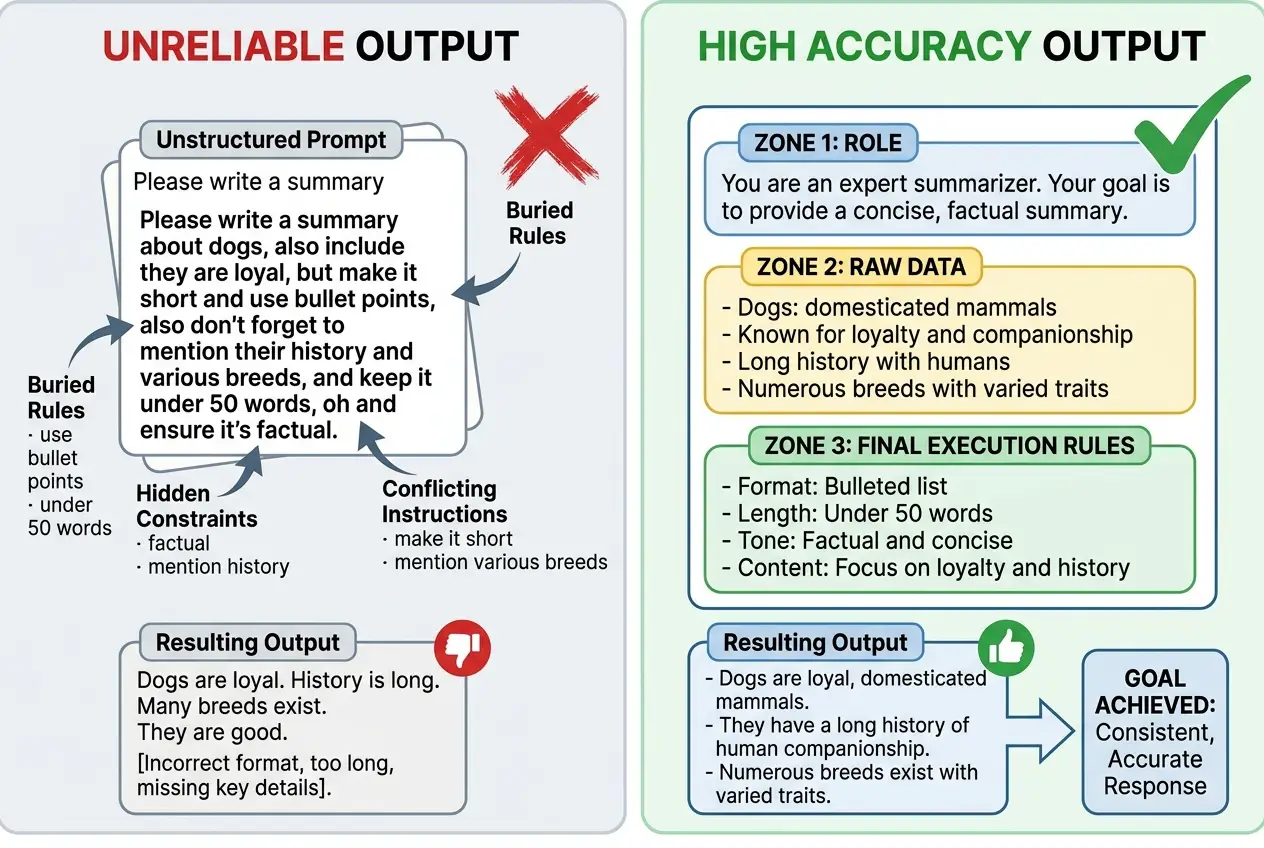
To bypass the U-curve, you need to structure your inputs intentionally. Instead of writing prompts as a single narrative stream, organize your text into three distinct functional zones.
1. The Primacy Zone (Top 20%)
This is where you establish high-level framing. Give the AI its primary objective, perspective, and core operating role.
2. The Data Zone (Middle 60%)
Place all reference text, raw documentation, code snippets, transcripts, and variables here. Because this region sits in the attention valley, it should contain only data to be analyzed, never operational rules.
3. The Recency Zone (Bottom 20%)
Place your strict execution constraints, negative prompts, output schemas, and formatting rules at the absolute end. This ensures the model processes your constraints immediately before generating its first token.
This is why moving your formatting constraints from line 5 to line 45 instantly fixes missing headers and broken JSON outputs.
 Why AI Ignores the Middle of Your Prompts
Here is a practical template you can adapt right away:
### SYSTEM OBJECTIVE
You are an expert technical editor. Analyze the provided case study and extract
the three primary system bottlenecks.

### REFERENCE DATA
<data>
[Paste your long document, transcript, or reference material here]
</data>

### EXECUTION CONSTRAINTS
1. List exactly 3 bottlenecks with bullet points.
2. For each bottleneck, quote one sentence directly from the reference data.
3. If an issue is not explicitly mentioned in the text, do not infer it.
4. Output format: Markdown table with columns: Bottleneck | Impact | Direct Quote.
Structural Anchors and Delimiters
Separating your prompt into zones is half the battle. The other half is making your data machine-readable using clear delimiters.
In modern natural language processing, models parse structured tags—like XML tags, Markdown headers (###), or triple backticks—much more reliably than conversational transitions like "Here is the text I want you to read:".
| Prompt Component | Poor Formatting Practice | High-Precision Formatting Practice |
|---|---|---|
| System Identity | "Act like a copywriter and..." | ### ROLE: Senior Direct-Response Copywriter |
| Reference Material | Pasted directly beneath text | <source_document>\n[Data]\n</source_document> |
| Constraints | "Make sure it is short and friendly" | ### CONSTRAINTS:\n- Word count: 150-200\n- Tone: Direct |
| Edge Cases | "Don't make up facts" | - If metric is missing, write 'DATA NOT PROVIDED' |
This is why formatting your prompt like code produces noticeably more rigorous answers than formatting it like an email.
If you are setting up reusable workflows, combining this delimiter approach with proper system prompts that actually work gives you reproducible results across team members.
How Multi-Model Strategy Fixes Context Bottlenecks
Not every task requires you to fight the U-curve inside a single prompt. When dealing with massive datasets—like 50-page technical specifications or months of team meeting transcripts—the most effective workflow often involves dividing the task across specialized models.
For instance, you might use a model with a massive context retrieval engine to scan and isolate key data fragments, then hand those distilled fragments to a high-reasoning model for final synthesis.
Understanding strategic model switching prevents you from forcing a single model to act as both an exhaustive search engine and a nuanced creative editor at the same time.
This is why attempting to do broad information retrieval and nuanced stylistic writing in the same single prompt usually results in mediocre execution on both fronts.
The Smallest Change That Solves the Issue
If you take nothing else away from this breakdown, adopt this single habit:
Never put a command where you should put reference data, and never put reference data at the end of your prompt.
Take two minutes on your next complex AI task to move your rules to the bottom and wrap your context in clear tags. You will immediately notice fewer hallucinations, zero missed constraints, and far less time spent hitting the regenerate button.
Frequently asked questions
Does increasing model context window size eliminate the Lost in the Middle problem?
Are XML tags better than Markdown delimiters for structuring prompts?
What should I do if my reference data is too long to fit in the 3-zone format?
Why does moving constraints to the bottom of the prompt work so well?
We build VirtuaChat and write about getting real work done with AI — prompting, models, images and audio.