
You hit enter on your AI code assistant, expecting a genius solution, but get something generic, buggy, or completely off-topic. Sound familiar? It’s a frustratingly common experience. We've been promised AI that writes perfect code, debunks complex errors, and even designs architectures. Yet, often, it feels like talking to a very smart but utterly clueless intern.
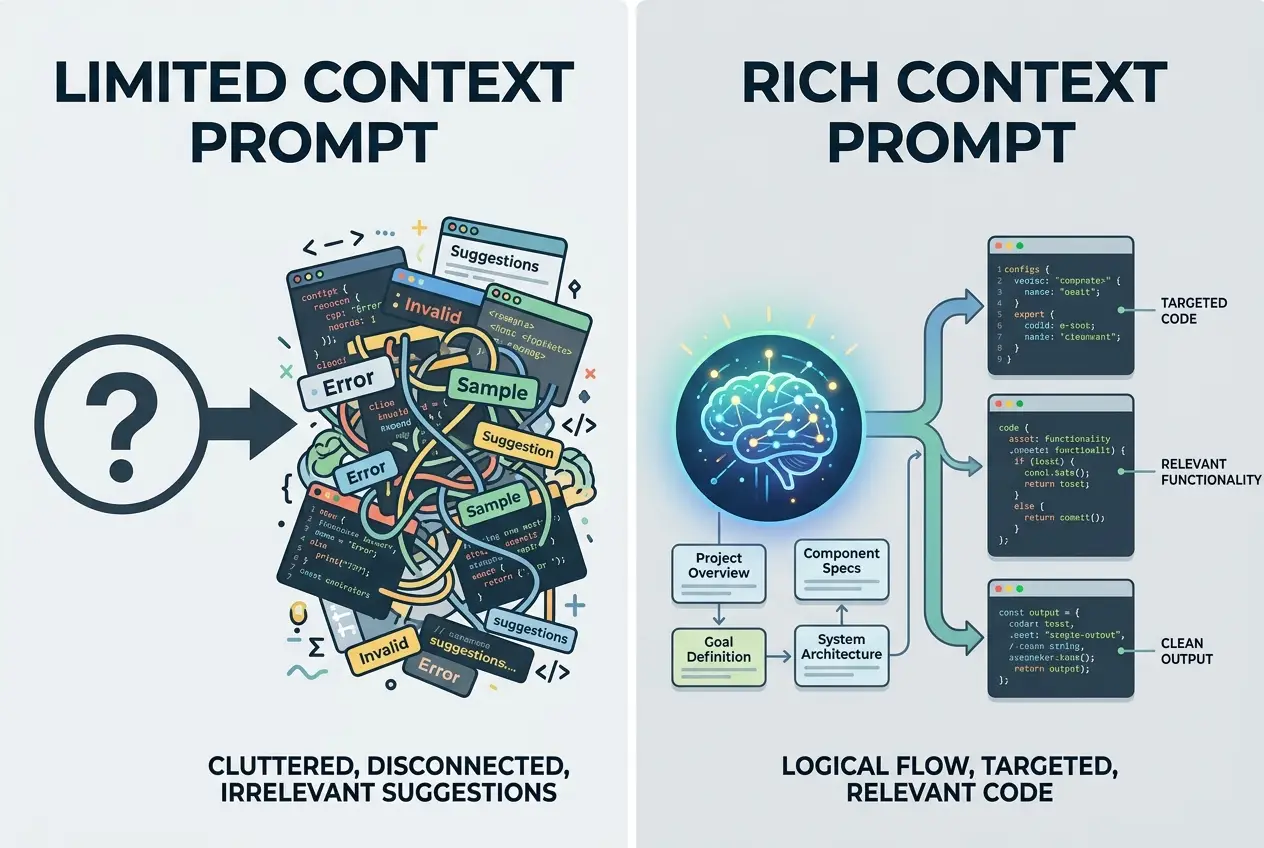
I've been there. I’ve copied an error message into an AI chat, hoping for a magical fix, only to receive a boilerplate response that missed the crucial context of my project. This isn't because the AI is "bad"; it's usually because I haven't given it enough to work with. Most developers treat their AI assistant like a glorified search engine or a single-shot command-line tool. But here's the secret: your AI code assistant fails because it lacks context, and you’re the only one who can provide it.
The Silent Killer: Lack of Context
Think about working with a human co-worker. If you just walk up and say, "My code isn't working," they'd stare at you blankly. They'd need to know what project you're on, what specific file, what the error message is, what you were trying to achieve, and what steps you’ve already taken. AI is no different, but we often forget this.
Your AI's "brain" is a vast language model trained on billions of lines of code and text. It excels at pattern recognition and generating statistically probable sequences. However, it has no inherent memory of your specific codebase, project architecture, or the nuances of your team's development environment. This is why your AI code looks like it came from a beginner, even when you're working on something complex. It’s making educated guesses without the full picture. Without a rich, ongoing understanding of the project, it's just generating code in a vacuum, leading to suggestions that are technically plausible but contextually irrelevant or even harmful. Understanding the concept of context in language use is crucial here; for AI, code is just another form of language.
Why Generic Answers Don't Help
When you ask for a fix without context, the AI defaults to the most common solutions it has learned. It's like asking a doctor for medicine without describing your symptoms or medical history. You might get a painkiller, but it won't address the root cause of your illness. This is why you often get fixes for common syntax errors when your problem is a subtle logic bug related to an obscure library.
 Why Your AI Code Assistant Fails (And the Simple Fix)
Beyond the Single Prompt: Briefing Your AI Collaborator
The fix isn't about learning obscure prompt keywords; it's about shifting your mindset. Treat your AI code assistant as an intelligent collaborator that needs to be brought up to speed. You wouldn’t throw a senior developer into a new project without an onboarding brief, and you shouldn’t do that with your AI either.
Laying the Groundwork: The Project Overview Prompt
Before asking for any specific code, give your AI a foundational understanding of your project. This initial "briefing" can dramatically improve the relevance and quality of its output. I always start a new coding session with my AI by providing a high-level overview.
Here’s a template I use:
As an expert Python/JavaScript/TypeScript developer, you are helping me with a [Web Application / API / Data Pipeline / etc.] project.

Here's a brief overview of the project:
- **Purpose:** [Explain what the project does in 1-2 sentences]
- **Key Technologies/Frameworks:** [e.g., Python, Django, PostgreSQL, React, TypeScript, Node.js, Express, Docker, AWS Lambda]
- **Project Structure (relevant parts):**
    - `src/handlers/` for API endpoints
    - `src/services/` for business logic
    - `src/models/` for database interactions (using SQLAlchemy)
    - `tests/` for unit and integration tests (using Pytest)
- **Coding Standards/Preferences:** [e.g., PEP8 compliant, functional programming style, use type hints, prefer async/await over callbacks, no global variables]
- **My Goal Right Now:** [e.g., "I'm currently working on adding a new user authentication flow." or "I need to fix a bug in the data processing service."]

Please confirm you understand and are ready to assist with this context.
This initial prompt establishes the AI's role, the domain, the tech stack, and even your preferred coding style. It's like handing over a project README before diving into specific tasks. This is a powerful form of prompt engineering, making sure the AI's "understanding" is aligned with your needs, a concept I've explored further in You've Been Prompting AI Wrong This Whole Time.
Feeding the Beast: Providing Specific Snippets & Errors
Once the AI has the big picture, you can start feeding it targeted information. Instead of just pasting an error, provide the surrounding code. Instead of asking for a function, show it where the function needs to fit and what data it will interact with.
Targeted Information: More Than Just an Error
Imagine your code throws an error. Copying just the traceback is rarely enough. The traceback tells you where it failed, but not always why in the context of your logic.
For example, instead of:
TypeError: 'NoneType' object is not subscriptable
Try this:
I'm getting a `TypeError: 'NoneType' object is not subscriptable` in my Python Django project.
It's happening in `src/services/user_service.py` at line 45.

Here's the relevant code snippet from `user_service.py`:

```python
# src/services/user_service.py
from src.models.user import User

def get_user_profile(user_id: int):
    # Line 45: The error occurs here
    user = User.objects.filter(id=user_id).first()
    if user:
        profile_data = {
            "username": user.username,
            "email": user.email,
            "settings": user.settings['preferences'] # This is where NoneType issue might be
        }
        return profile_data
    return None

# Somewhere else, this function is called:
# profile = get_user_profile(123)
# print(profile)
My assumption for the bug: I suspect user.settings might be None or not have a preferences key if the user has no settings defined.
What I want: Help me modify get_user_profile to safely handle cases where user.settings is None or doesn't contain preferences, perhaps returning an empty dictionary for settings in such cases.
This is why your AI suggests irrelevant fixes. It needs to "see" the code around the problem. By providing the full context, you guide the AI directly to the problematic line and even suggest your hypothesis, allowing it to validate or correct it with much higher accuracy.

## Multi-Model Magic for Code

Not all AI models are created equal, especially when it comes to specific programming languages or tasks. One model might be excellent at generating boilerplate Python, while another excels at complex TypeScript type definitions or debugging tricky C++ memory issues. Leveraging a platform that offers multi-model chat allows you to switch between models without losing your conversational context.

### Choosing the Right Brain for the Job

I've found that some models are better at understanding highly abstract architectural concepts, while others are more precise with syntax and error correction in specific languages. Don't be afraid to experiment. If one model gives you a generic answer, try prompting the same context to a different model available on your platform.

For example:

| Task / Language           | Model A (e.g., GPT-4)       | Model B (e.g., Claude 3)    | Model C (e.g., Gemini Pro) |
| :------------------------ | :-------------------------- | :-------------------------- | :------------------------- |
| **Python Data Science**   | Strong, good for libraries  | Good for logical flow       | Excellent for algorithms   |
| **JavaScript/TypeScript** | Good for React/Next.js      | Excellent for type safety   | Strong for Node.js backend |
| **Go/Rust Performance**   | Decent for basic structures | Struggles with memory/async | Better for concurrency     |
| **Debugging Complex SQL** | Strong, understands schemas | Good for query optimization | Less effective             |

*This is a hypothetical table for illustration purposes based on common model strengths.*

This targeted approach ensures you're always getting the best possible assistance for the problem at hand. It also helps manage larger projects where you might be working across different languages or frameworks, as detailed in [When to Switch AI Models: The Multi-Model Secret](/blog/when-to-switch-ai-models-the-multi-model-secret-7791).

## The Iterative Dance: Refinement and Testing

AI is a co-pilot, not an autopilot. Its first suggestion might not be perfect, but it's a valuable starting point. Your role is to critique, refine, and provide feedback. This iterative process is where the real magic happens.

### From Draft to Production: Testing AI's Output

When AI provides a code snippet or a fix, don't just copy-paste and assume it works. Integrate it into your project, run your tests, and confirm its functionality. Think of it as reviewing a pull request from a junior developer.

**Here's my workflow:**

1.  **AI Provides Code:** I get a suggestion.
2.  **Initial Review:** I read through the code. Does it make sense? Does it fit my style? Are there obvious errors or logical flaws?
3.  **Local Testing:** I integrate it and run existing unit and integration tests. If I don't have tests, I write minimal tests for the new functionality. [Software testing](https://en.wikipedia.org/wiki/Software_testing) is crucial here, even for AI-generated code.
4.  **Feedback Loop:** If something fails or isn't quite right, I go back to the AI with specific feedback: "The previous code caused a `KeyError` here because X. Can you modify it to account for that?" or "This solution works, but it's not as performant as I need. Can you suggest an optimized version?"

This continuous feedback loop allows the AI to learn *your* specific requirements and project nuances over time, making it an increasingly valuable and personalized assistant.

## Conclusion

The primary reason your AI code assistant falls short isn't a limitation of the technology itself, but often how we, as developers, interact with it. By shifting from a transactional "ask and receive" approach to a collaborative "brief and refine" mindset, you unlock the true potential of AI in your development workflow. Start with a comprehensive project overview, provide targeted code snippets, leverage different AI models for specialized tasks, and embrace an iterative feedback loop. This proactive engagement transforms your AI from a generic suggestion box into an invaluable, context-aware coding partner. If you're ready to stop debugging AI-generated code and start *developing* with it, this new approach is your most powerful tool.
Frequently asked questions
How much context is too much to give an AI code assistant?
Should I use different AI models for different programming languages?
My AI code is often buggy. How can I trust it?
Is it better to have one long conversation with AI or start fresh for each task?
Can AI help me debug complex architectural issues, or is it only good for syntax errors?
We build VirtuaChat and write about getting real work done with AI — prompting, models, images and audio.