
You ask the model for a clean JSON array with three specific fields. You explicitly add: "Do not write any conversational intro, summary, or markdown backticks." You hit send, and the model immediately responds with: "Sure! Here is the structured JSON data you requested:" wrapped inside nested code blocks and conversational fluff.
I spent three hours debugging an automated data extraction script last month only to realize the failure wasn't in my backend code. It was the AI adding polite conversational chatter to what was supposed to be a pure raw payload.
When you build daily workflows around generative tools, broken output formatting isn't just a minor annoyance—it completely breaks automated pipelines. Understanding why generative models resist rigid formatting boundaries is the first step toward getting clean, predictable outputs every single time. If you have ever felt frustrated because of why AI ignores half your prompt, explicit formatting rules are almost always the first thing to break.
The Attention Mechanism and Token Drift
To fix why an AI model ignores your formatting constraints, you have to look at how a Large language model processes text. Models do not follow logic rules the way traditional software code executes. Instead, they calculate mathematical probability distributions for the next likely token.
The underlying architecture relies heavily on an Attention mechanism. When you feed a prompt into a model, every single token competes for attention weight. If your prompt contains extensive background context, the model's focus spreads thin across the entire sequence length.
This creates positional bias, where models pay heavy attention to tokens at the absolute beginning and end of a context window while neglecting rules buried in the middle.
This is why adding "DO NOT USE CONVERSATIONAL FILLER" at the top of a prompt rarely works when your input document is two thousand words long.
This is why your automated pipeline breaks every time you run a batch processing script over dense source text.
"Language models don't read prompts top-to-bottom like human readers or traditional code; they calculate token probability distributions based on positional embeddings," notes AI researcher Andrej Karpathy.
Why Negative Constraints Fail in LLMs
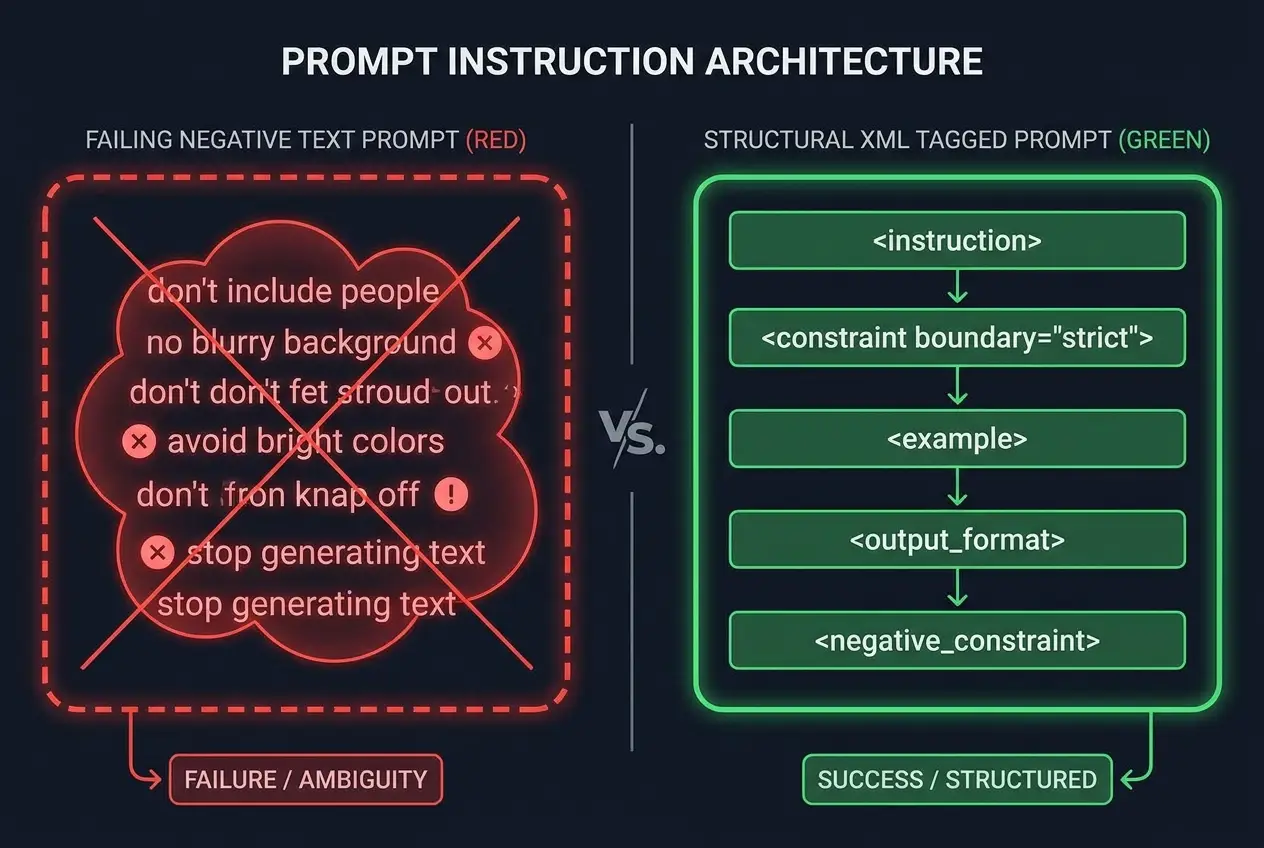
When humans want to prevent a mistake, we naturally rely on negative commands: "don't include intro text," "do not use bullet points," or "never format as HTML." In Natural language processing, negative constraints are notoriously unreliable.
Generative models process context positively. When you write "Do not include conversational chatter," you place the tokens "conversational chatter" directly into the context window. During token generation, those exact concepts gain activation energy inside the neural network's self-attention layers.
Instead of suppressing conversational filler, you have accidentally primed the neural network to think about conversational filler.
This is why telling the model "never output introductory text" often results in the model typing "Here is your text without introductory filler:" as its very first output line.
This is why raw text instructions fail silently when you send requests in bulk across automated scripts.
 Why AI Ignores Your Formatting Rules (And the Fix)
To bypass this fundamental flaw, you must replace negative commands with visual structural enclosures. Master night-and-day output quality by learning how to write system prompts that actually work instead of stacking loose prose rules.
Comparing Formatting Techniques for Precision
Not all prompting methods deliver equal reliability when you need strict formats like JSON, CSV arrays, or Markdown tables. Choosing the right approach depends on whether you are chatting manually or running backend software calls.
Here is how common prompt formatting techniques perform across actual benchmark tests:
| Technique | Formatting Reliability | Latency Impact | Best Use Case |
|---|---|---|---|
| Plain Text Directives | Low (40%–60%) | Lowest | Quick single-shot chat queries |
| Negative Constraints ("Do Not") | Poor (30%–50%) | Lowest | Simple conversational edits |
| XML Tag Isolation | High (85%–95%) | Negligible | Document parsing & bulk extraction |
| Few-Shot Examples | Very High (90%–98%) | Moderate | Custom schemas & strict data formats |
| Native API Structured Output | Absolute (100%) | Varies | Production backend SaaS integrations |
This is why your teammate gets perfectly formatted tables while your chat session turns into markdown chaos—they structure instructions using explicit markup boundaries rather than open conversational paragraphs.
This is why switching from open-ended prompts to strict XML markup changes your results instantly without changing the underlying model.
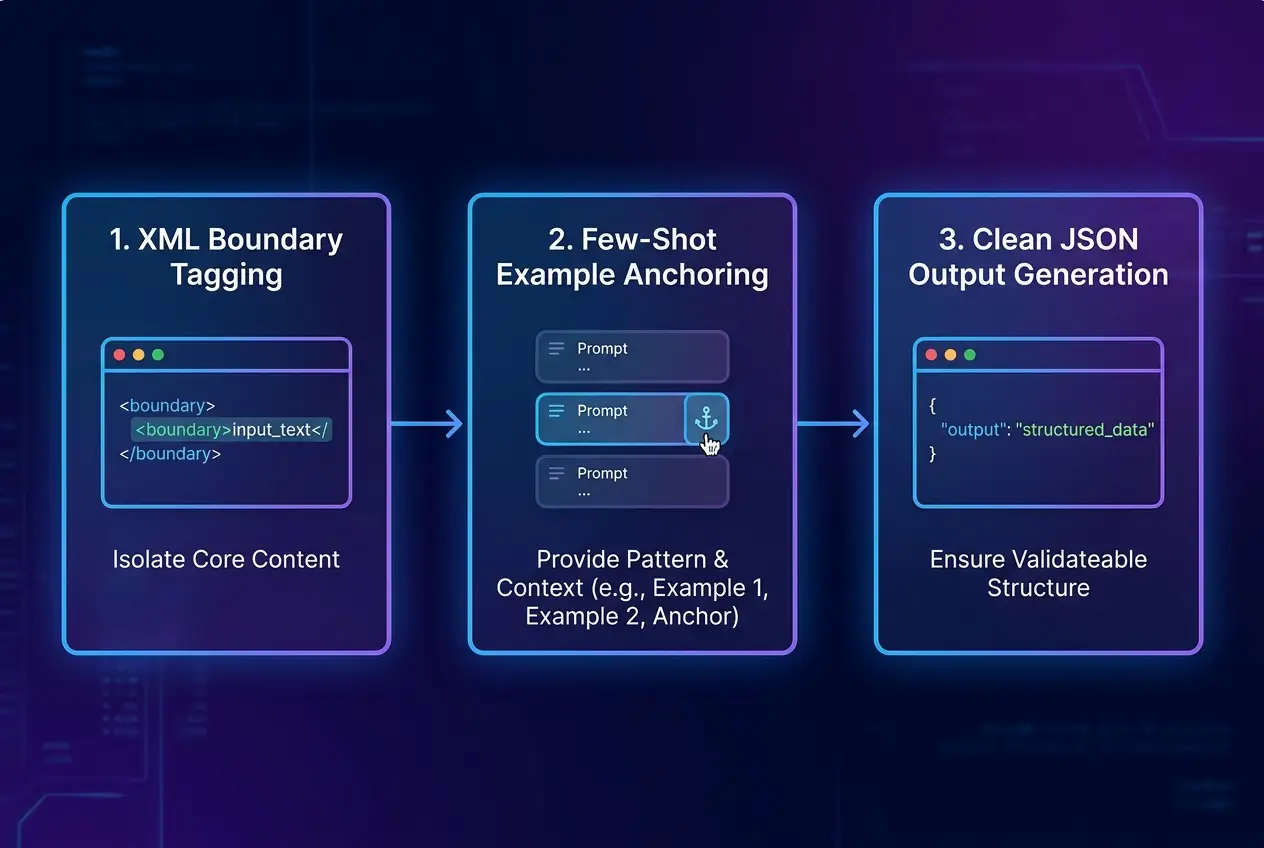
The 3-Step Fix for Bulletproof AI Outputs
If you want an AI model to stick to your formatting rules 100% of the time, stop treating your prompt like a conversational request and start treating it like a technical markup document.
Step 1: Wrap Rules and Inputs in Structural XML Tags
Large language models are heavily trained on code, HTML, and web markup. Using explicit XML tags isolates your formatting constraints from your input payload cleanly.
<system_instructions>
Output MUST be raw JSON only. Do not wrap in markdown code blocks.
</system_instructions>

<input_data>
John Doe is a 34 year old software engineer based in Austin, Texas.
</input_data>

<output_schema>
{"name": "string", "age": "number", "city": "string"}
</output_schema>
Step 2: Use Few-Shot Examples Over Verbal Rules
Instead of describing the output format in lengthy English sentences, show the model exactly what you expect using Few-shot learning. Providing even one ideal input-output pair anchors token prediction immediately.
Input: Jane Smith, age 29, designer living in Seattle.
Output: {"name":"Jane Smith","age":29,"city":"Seattle"}

Input: {USER_INPUT}
Output:
Step 3: Anchor Constraints at the Absolute End
Capitalize on recency bias by placing your key output instruction at the very bottom of the prompt window. The final tokens in the prompt hold disproportionate weight when generating the first output token.
This is why moving your formatting rules from line two to the absolute last line of your prompt instantly fixes eighty percent of formatting failures.
This is why ending your prompt directly with the raw character { forces the model straight into structured JSON mode without conversational lead-ins.
 Why AI Ignores Your Formatting Rules (And the Fix)
Realizing that output reliability hinges on structural framing is essential if you suspect you've been prompting AI wrong this whole time. Converting your prompts into structured blueprints eliminates hours of annoying manual data cleaning.
If you rely on generative AI daily for data transformation or content parsing, try converting one of your failing prompts into XML boundaries today. The dramatic increase in consistency will speak for itself.
Frequently asked questions
Does lowering the temperature setting help AI follow formatting rules better?
Why does the AI still wrap JSON in markdown code blocks even when told not to?
Do structural tags like XML work across all LLM models?
Are few-shot examples necessary if I already use native JSON mode?
We build VirtuaChat and write about getting real work done with AI — prompting, models, images and audio.